If you’re starting an online store or thinking about switching platforms, you’ve probably narrowed it down to two names: Shopify and WooCommerce. They’re the most popular ecommerce platforms for small businesses, and both power successful stores of every size.
So which one is right for you? The honest answer to Shopify vs WooCommerce is “it depends,” but it depends on a handful of clear things: who will run the store, how much control you want, how important SEO and content are, and how fees add up as you grow. We build and manage stores on both, so here’s a straight comparison without the sales pitch.
The short version
- Shopify is a hosted, all-in-one platform: easy to launch and manage, with predictable monthly plans and app costs.
- WooCommerce is a free, open-source plugin for WordPress: more control and flexibility, but you manage hosting, security and updates.
- Shopify suits owners who want simplicity. WooCommerce suits stores that rely on content, SEO, custom features or B2B workflows.
- Compare the total yearly cost, including apps, plugins, hosting and payment fees, not just the plan price.
What Are Shopify and WooCommerce?
Shopify is a software-as-a-service platform. You pay a monthly subscription, and Shopify handles hosting, security, updates and checkout. You customize your store with themes and add features through the Shopify App Store.
WooCommerce is a free plugin that turns a WordPress website into an online store. You choose your own hosting, install WooCommerce, pick a theme and add extensions. Because it’s open source, you own your code and data completely.
Both are huge. W3Techs data shows WooCommerce running on more websites overall, largely because WordPress powers so much of the web, while Shopify is especially strong among larger, high-traffic stores. Neither is going anywhere, so you’re not betting on a platform that might disappear.
Shopify vs WooCommerce: Quick Comparison
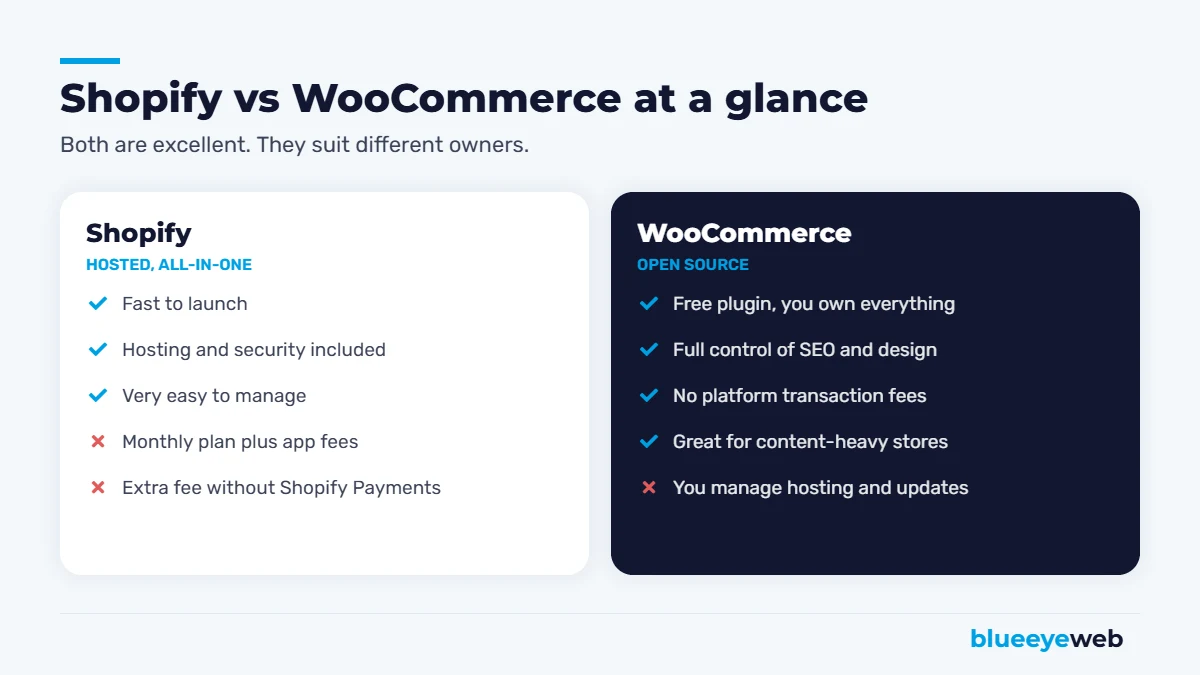
| Shopify | WooCommerce | |
|---|---|---|
| Setup | Fast, guided | Needs hosting and WordPress setup |
| Monthly platform cost | Plan from about $39/month (less billed annually) | Plugin is free; you pay for hosting |
| Transaction fees | Extra 0.6% to 2% if not using Shopify Payments | None from WooCommerce |
| Hosting and security | Included | Your responsibility (or your host’s) |
| Design flexibility | Good, within theme limits | Almost unlimited |
| SEO control | Good, some fixed URL patterns | Full control |
| Content and blogging | Basic blog | WordPress, best in class |
| Maintenance | Minimal | Regular updates needed |
| Ownership | Platform-hosted | You own everything |
Cost: What You’ll Really Pay
This is where most comparisons go wrong. They compare Shopify’s plan price with WooCommerce’s “free” and stop there. Here’s a fuller picture.
Shopify costs
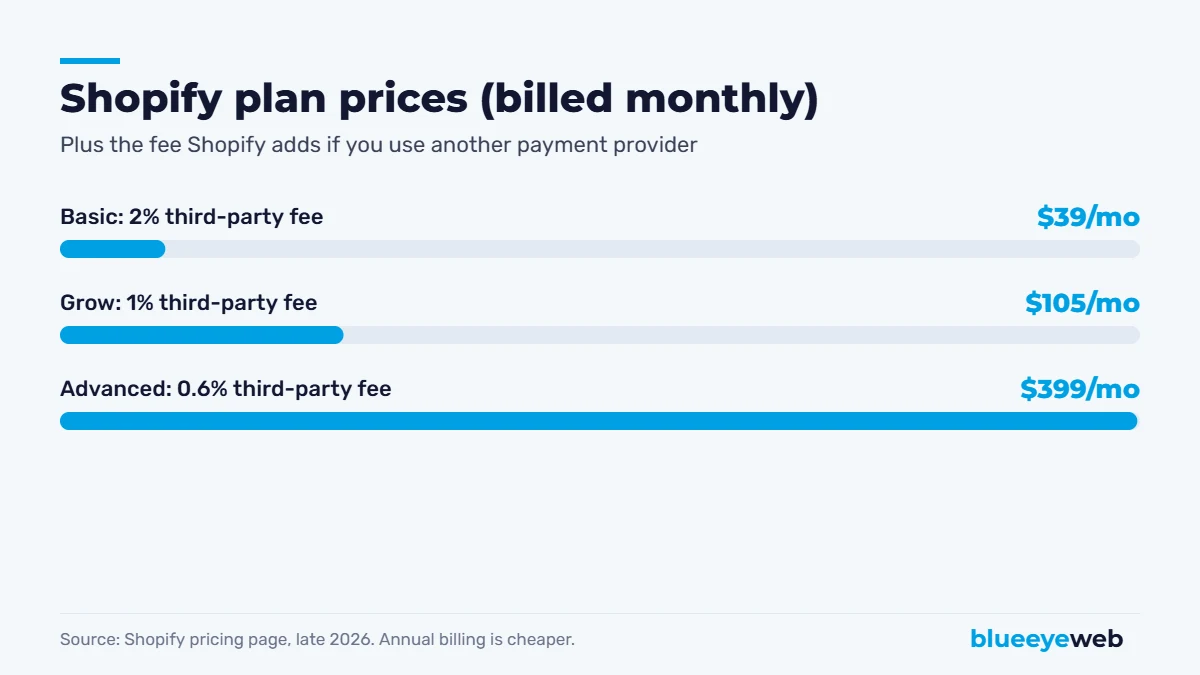
According to Shopify’s pricing page, the main plans are Basic, Grow and Advanced, at roughly $39, $105 and $399 per month billed monthly, or less when billed annually. Card processing through Shopify Payments starts at 2.9% plus 30 cents per online transaction on Basic and drops on higher plans. If you use another payment provider, Shopify adds its own fee on top: 2% on Basic, 1% on Grow and 0.6% on Advanced.
Then add apps. Reviews, subscriptions, upsells, advanced filtering, SEO tools and email often run $10 to $50 each per month. A typical small Shopify store ends up paying noticeably more than the plan price once apps are counted.
WooCommerce costs
The WooCommerce plugin is free, but a real store needs good hosting (from roughly $15 to $50+ per month for quality managed WordPress hosting, more for busy stores), a domain, an SSL certificate (often included with hosting), a theme and some premium extensions for things like subscriptions, bookings or advanced shipping. Payment processing through providers like Stripe or PayPal typically starts around 2.9% plus 30 cents per online card transaction, with no extra platform fee from WooCommerce.
The hidden cost with WooCommerce is maintenance: updates, backups, security monitoring and fixing conflicts between plugins. Either you spend time on it, or you pay someone. Our website maintenance cost guide breaks down what that usually costs.
Run your own numbers: list every app or plugin you’ll need, your hosting or plan, and your expected monthly sales. At higher sales volumes, transaction fees often matter more than the subscription price.
Ease of Use
Shopify wins here, and it’s not close. You can launch a basic Shopify store in a weekend without touching code. The admin is clean, updates happen automatically and support is available 24/7.
WooCommerce has a steeper learning curve. You’ll work in WordPress, manage plugins and occasionally deal with compatibility issues. Once it’s set up well, day-to-day tasks like adding products and processing orders are easy, but the setup itself usually benefits from professional help.
SEO: Which Platform Ranks Better?
Both can rank very well. Good content, fast pages and smart site structure matter far more than the platform. But there are real differences.
WooCommerce gives you complete control: custom URL structures, full access to schema markup, any SEO plugin you like (Rank Math, Yoast), and WordPress’s excellent blogging and content tools. For stores that win through content, buying guides and category pages packed with useful information, WooCommerce has an edge.
Shopify handles SEO basics well out of the box, with clean code, sitemaps, editable titles and fast hosting. The limitations are fixed URL patterns (/products/ and /collections/), some duplicate URL quirks and a more basic blog. Most of these are manageable with good setup and the right apps.
Either way, the work is the same: keyword-focused categories, unique product descriptions, product schema and fast mobile pages. Our full ecommerce SEO guide walks through it step by step.
Speed and Performance
Shopify’s hosting is fast and consistent, which helps most stores pass Core Web Vitals without much tuning, though too many apps can slow things down. WooCommerce speed depends heavily on your hosting, theme and plugins. With quality hosting, caching, optimized images and a lean setup, a WooCommerce store can be just as fast. With cheap hosting and 40 plugins, it won’t be. Our speed optimization work often focuses on exactly this.
Flexibility and Customization
WooCommerce is the clear winner on flexibility. Because you control the code, you can build almost anything: custom product configurators, wholesale pricing, complex B2B ordering, membership areas, unusual checkout flows and deep integrations with ERP or inventory systems.
Shopify is flexible within its ecosystem. Most standard needs are covered by apps, and Shopify Plus unlocks more for larger brands. But if your idea doesn’t fit Shopify’s model, you can hit walls that cost money or can’t be solved at all.
Security and Maintenance
With Shopify, security, PCI compliance, updates and uptime are Shopify’s job. That’s a big relief for owners without technical help.
With WooCommerce, they’re yours. That doesn’t make WooCommerce unsafe. It means it needs care: updates, backups, a good host, a firewall and monitoring. Most WordPress security problems come from outdated plugins, not from WooCommerce itself. Our security monitoring service handles this for WooCommerce stores.
Shopify vs WooCommerce by Type of Store
General comparisons only go so far. Here’s how the Shopify vs WooCommerce decision usually plays out for specific kinds of stores.
Local retail with a physical shop
If you sell in person and online, Shopify’s point-of-sale system is a strong reason to choose it. Inventory, customers and sales sync across your shop and website without extra plugins. WooCommerce can do this with third-party POS integrations, but it takes more setup.
B2B and wholesale
Tiered pricing, customer-specific catalogs, quote requests, net payment terms and bulk ordering are where WooCommerce shines, because it can be customized to match how your buyers actually order. Shopify offers B2B features mainly on its higher-priced plans.
Subscriptions and memberships
Both handle subscriptions through extensions or apps. WooCommerce pairs naturally with WordPress membership plugins if you also sell courses or gated content. Shopify subscription apps are polished and easy to manage.
Dropshipping and print-on-demand
Shopify has the largest ecosystem of dropshipping and print-on-demand apps, and the fastest path to launch. It’s the usual choice for testing products quickly.
Large catalogs and regulated products
Stores with hundreds or thousands of SKUs, technical specifications, compliance information or detailed category content often benefit from WooCommerce’s flexibility and WordPress’s content tools. That’s one reason we run DrugTestingCup.com on WooCommerce.
Digital products
Both work well. If you already publish content on WordPress, WooCommerce keeps everything in one place. If you want zero maintenance, Shopify with a digital downloads app is simpler.
When Shopify Is the Better Choice
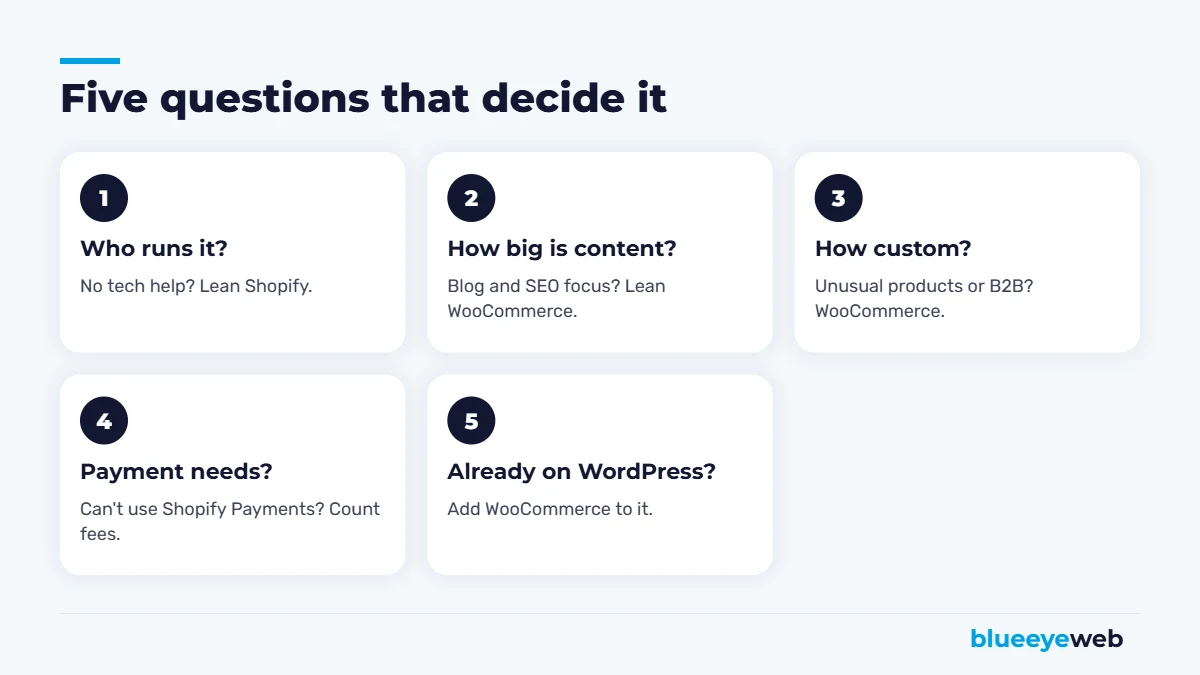
- You want to launch quickly and don’t have technical help.
- You’d rather pay a predictable monthly fee than manage hosting and updates.
- Your products and checkout are fairly standard.
- You sell across many channels (social, marketplaces, in person) and want them in one dashboard.
- You plan to scale fast and want a platform built for high traffic out of the box.
When WooCommerce Is the Better Choice
- You already have a WordPress website and want to add a store.
- Content and SEO are central to how you get customers.
- You need custom features, wholesale pricing or B2B workflows.
- You want full ownership of your site, data and code.
- You want to avoid platform transaction fees and choose any payment provider.
- You have a developer or agency to handle setup and maintenance.
Can You Switch Later?
Yes, and stores move in both directions every day. Products, customers and orders can be migrated with tools or by a developer. The tricky part is SEO: URLs change between platforms, so every old product and category URL needs a 301 redirect to its new home, or you risk losing rankings. We cover the process in our guide to redesigning without losing SEO. Plan a migration carefully and it’s very manageable.
Our Experience with Both
We build and run stores on both platforms. For example, we built MossArtDeals.com on WooCommerce from scratch, including hosting, design, checkout and SEO, and we manage the WooCommerce store behind DrugTestingCup.com, where content-heavy product and category pages are central to its organic growth. For clients who want a simpler, hands-off setup, we often recommend Shopify. The right platform is the one that fits how you’ll actually run the business.
One last factor people overlook: who will help you later. Shopify experts and WordPress developers are both easy to find, but make sure whoever builds your store documents the setup, gives you full admin access and doesn’t lock you into custom code only they understand. Your store should belong to you, whichever platform you choose.
The Bottom Line
Choose Shopify if you want simplicity, speed to launch and minimal technical responsibility, and you’re comfortable with monthly plan and app costs.
Choose WooCommerce if you want control, flexibility, ownership and a content-driven SEO strategy, and you have (or will hire) someone to keep it maintained.
Still not sure? Our comparison of WordPress vs Wix vs Squarespace covers the website-builder side of the same decision.
Not sure which platform fits your store?
Tell us what you sell, how you sell it and who will run the store. We’ll recommend the right platform and give you a clear quote to build it.
Frequently Asked Questions
Shopify is easier for beginners because hosting, security and updates are included and the setup is guided. WooCommerce has a steeper learning curve but offers more control.
The WooCommerce plugin is free, but running a store costs money for hosting, a domain, a theme, premium extensions, payment processing and maintenance.
If you use Shopify Payments, Shopify does not add a separate transaction fee beyond card processing rates. If you use another payment provider, Shopify adds 0.6% to 2% depending on your plan.
Both can rank well. WooCommerce offers more control over URLs, schema and content, which helps content-heavy stores. Shopify covers SEO basics well but has fixed URL structures.
Yes. Products, customers and orders can be migrated. The key is setting up 301 redirects from old URLs to new ones so you keep your search rankings.
It depends on your apps, plugins, hosting and sales volume. WooCommerce often costs less at higher sales volumes because there are no platform transaction fees, while Shopify can be cheaper for small stores without maintenance help.