If your website isn’t bringing in traffic or leads, there’s usually a reason, and it’s rarely just one thing. An SEO audit is how you find those reasons, rank them by impact and fix the ones that matter first.
The good news is that you don’t need expensive software to run a solid audit. In this guide, we’ll walk through the same 25-point checklist we use for small business websites, explain what each check means in plain English, and show you which free tools to use.
The short version
- An SEO audit is a health check of everything that affects how your site ranks: technical setup, content, local signals and authority.
- Start with indexing. If Google can’t find or store a page, nothing else matters for that page.
- Most small business sites have the same handful of fixable problems: slow mobile pages, weak titles, thin service pages and missing schema.
- Turn the audit into a prioritized fix list, not a 90-page PDF nobody reads.
What Is an SEO Audit?
An SEO audit is a structured review of your website and online presence to find issues that keep you from ranking well in search engines, and now in AI answers too. It looks at whether search engines can crawl and index your pages, whether your pages are fast and mobile-friendly, whether your content matches what people search for, and whether the web trusts your business.
A good audit ends with a clear, prioritized list: what’s broken, why it matters and what to fix first. That last part is what separates a useful audit from a scary-looking report.
When Should You Do an SEO Audit?
At minimum, once a year. You should also run one before and after a website redesign, when traffic drops suddenly, after a major Google update, before you start a new SEO campaign, and when you take over a site someone else built. A quick monthly check in Google Search Console catches most problems early.
Free Tools You’ll Need
- Google Search Console: indexing, search queries, Core Web Vitals and errors, straight from Google.
- PageSpeed Insights: real-world speed data for mobile and desktop.
- Screaming Frog SEO Spider: crawls up to 500 URLs free and finds broken links, missing titles and redirects.
- Rich Results Test: checks your schema markup.
- Google Analytics 4: traffic, conversions and which pages actually bring leads.
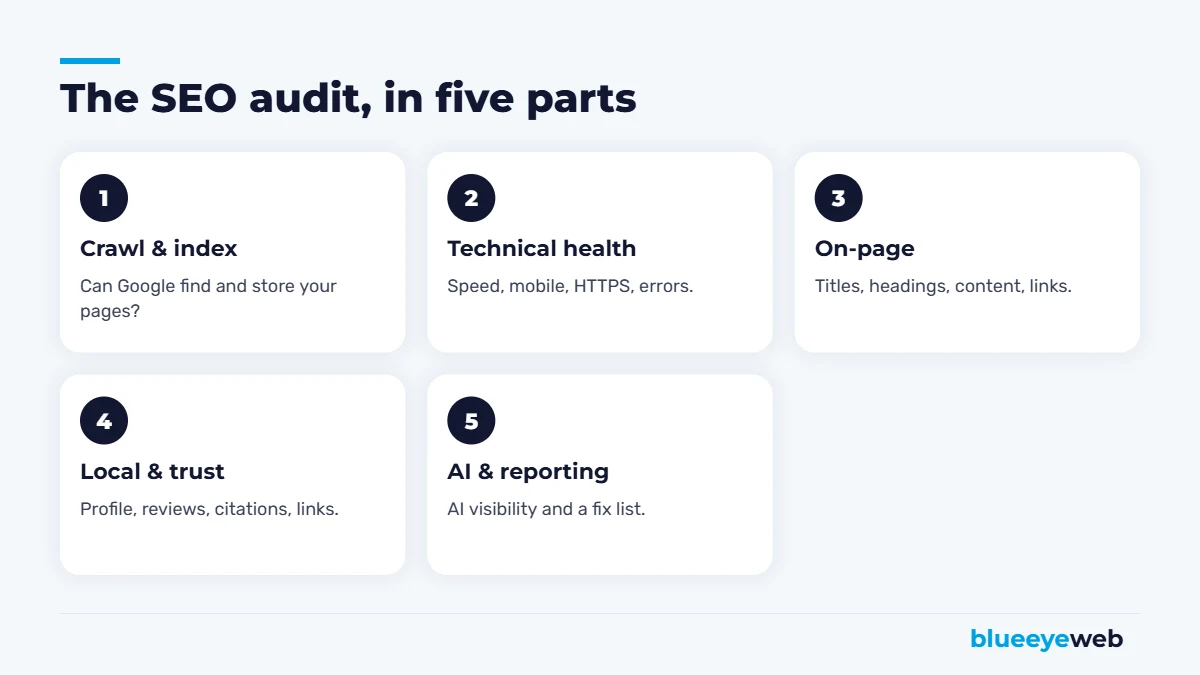
Part 1: Crawling and Indexing (Checks 1 to 5)
This comes first for a reason. If Google can’t find or index a page, it can’t rank, no matter how good the content is.
1. Check how many pages are indexed
In Search Console, open the Pages report. Compare the number of indexed pages to the number of pages you actually want in Google. A big gap in either direction means trouble: important pages missing, or junk pages like tags, test pages and attachment URLs cluttering the index.
2. Look for accidental noindex tags
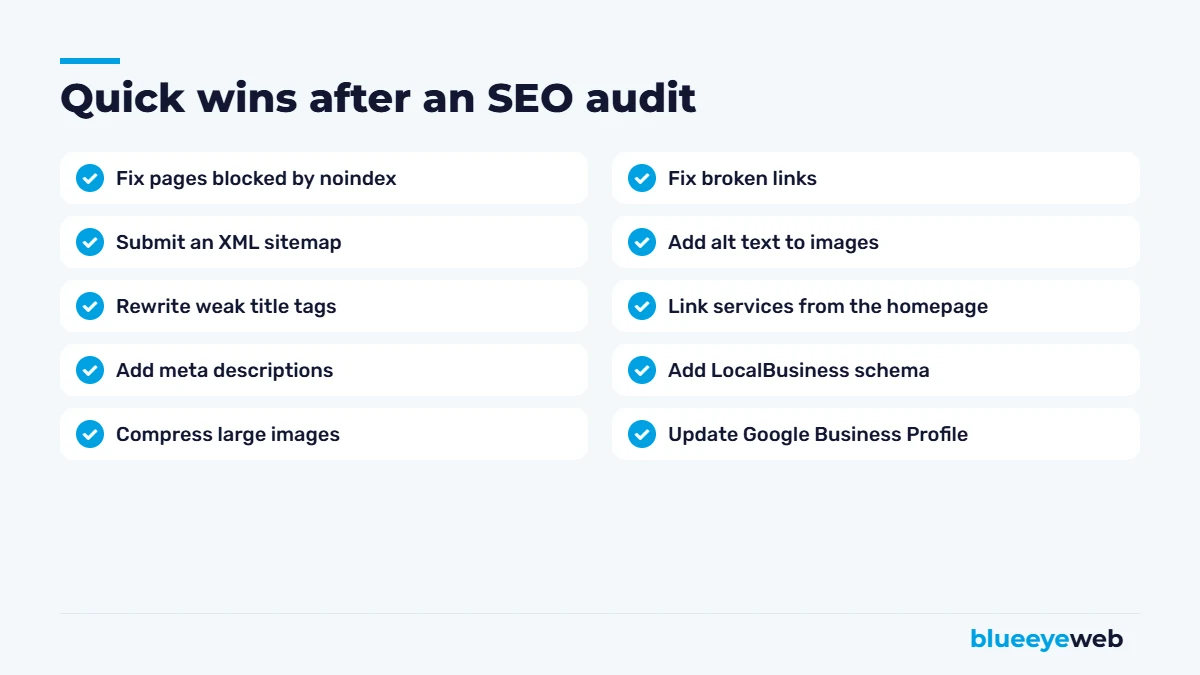
It happens more often than you’d think, especially after a redesign. A single “discourage search engines” checkbox in WordPress can hide an entire site. Check your key pages with Search Console’s URL Inspection tool.
3. Review robots.txt
Visit yoursite.com/robots.txt. Make sure it isn’t blocking important folders, CSS or JavaScript files Google needs to render your pages.
4. Submit an XML sitemap
Your SEO plugin usually creates one automatically. Submit it in Search Console and make sure it only lists pages you want indexed.
5. Fix canonical and duplicate issues
The same page at several URLs (with and without “www,” with and without a trailing slash, HTTP and HTTPS) splits your ranking power. Every page should have one preferred version, with the others redirecting to it.
Part 2: Technical Health (Checks 6 to 11)
6. Mobile page speed and Core Web Vitals
Speed is still a weak spot across the web. The HTTP Archive’s 2025 Web Almanac found only 48% of mobile websites pass Google’s Core Web Vitals. Check the Core Web Vitals report in Search Console, then test your top pages in PageSpeed Insights. Large images, heavy page builders and too many plugins are the usual suspects. Our speed optimization service usually starts here.
7. Mobile usability
Open your site on a phone. Can you read the text without zooming? Are buttons easy to tap? Does anything spill off the screen? Google indexes the mobile version of your site first, so this matters more than how it looks on your desktop.
8. HTTPS everywhere
Every page should load securely, with no “not secure” warnings and no mixed content (images or scripts loading over HTTP).
9. Broken links and 404 errors
Crawl the site with Screaming Frog and fix any internal links that point to missing pages. For deleted pages that still get traffic or links, set up 301 redirects to the closest relevant page.
10. Redirect chains
A redirect that points to another redirect that points to another page wastes crawl time and slows visitors down. Point old URLs straight to their final destination.
11. Structured data (schema)
Schema markup helps Google and AI tools understand your business: LocalBusiness, services, FAQs, reviews and articles. Run your homepage and a service page through the Rich Results Test. Missing schema is one of the most common gaps on small business sites.
Part 3: On-Page SEO and Content (Checks 12 to 18)
On-page problems are the most common findings in small business audits: weak titles, missing descriptions, thin service pages and images without alt text. None of them are hard to fix. They’re just easy to miss when you’re busy running a business.
12. Title tags
Every page needs a unique title, ideally under 60 characters, that includes the main keyword and, for local businesses, the city. “Roof Repair in Boca Raton | Free Inspection | ABC Roofing” beats “Services.”
13. Meta descriptions
They don’t directly affect rankings, but they affect clicks. Write a unique, benefit-focused description of about 150 characters for every important page.
14. One H1 and a logical heading structure
Each page should have one H1 that says what the page is about, followed by H2s and H3s that break the content into clear sections. Headings help readers skim, and they help search engines and AI tools understand your content.
15. Thin or duplicate content
Service pages with two sentences and a contact form rarely rank. Each main service deserves its own page that explains what you do, who it’s for, how it works, what it costs or how pricing works, and answers common questions. Our SEO content writing team builds these pages for clients every week.
16. Keyword targeting and cannibalization
Map one primary keyword to each page. If three pages target the same phrase, Google has to guess which one to rank, and often picks none of them well.
17. Internal links
Your homepage and blog posts should link to your key service pages with descriptive anchor text. Pages with no internal links pointing to them (“orphan pages”) are hard for Google to find and value.
18. Images and alt text
Compress images, use modern formats like WebP, and add short, descriptive alt text. It helps accessibility, image search and page speed all at once.
Part 4: Local Signals and Authority (Checks 19 to 22)
19. Google Business Profile
Check categories, services, hours, photos, posts and reviews. For local businesses, this profile often drives more calls than the website itself. Our Google Business Profile guide covers it in detail.
20. NAP consistency
Your business name, address and phone number should be identical on your website, Google, Yelp, Apple Maps, Bing and industry directories.
21. Reviews
Look at the number, rating, recency and whether you reply. Compare yourself to the top three competitors in the map pack.
22. Backlinks
Which sites link to you, and are they relevant? A few links from local organizations, suppliers, news sites and industry associations are worth more than hundreds of random directory links. Watch for spammy links you didn’t build.
Part 5: AI Search and Measurement (Checks 23 to 25)
23. AI visibility
Ask ChatGPT, Gemini and Google’s AI Mode the questions your customers ask, like “best HVAC company in Boynton Beach.” Are you mentioned? Is the information about you correct? Clear service pages, FAQs, schema and consistent mentions across the web all help. Not sure where you stand? Try our Free AI Visibility Check.
24. Conversion tracking
Make sure Google Analytics 4 tracks form submissions, calls and bookings. An audit that can’t connect SEO to leads is only half an audit.
25. Search Console performance
Look at queries where you rank in positions 5 to 20 with lots of impressions. These “almost there” pages are often your fastest wins: a better title, more helpful content or a few internal links can push them onto page one.
How to Prioritize Your SEO Audit Findings
An audit will probably uncover dozens of issues. Don’t try to fix everything at once. Sort them into three groups:
- Critical: anything blocking indexing, broken pages that get traffic, security warnings and pages that don’t work on mobile. Fix these this week.
- High impact: slow pages, weak titles on key service pages, thin content on money pages, missing schema and Google Business Profile gaps. Fix these this month.
- Nice to have: minor alt text gaps, old blog posts and small redirect chains. Work through these over time.
Following Google’s SEO Starter Guide is a good sanity check: if a fix makes your site more useful and easier to understand for real people, it’s almost always the right call.
DIY SEO Audit vs Professional SEO Audit
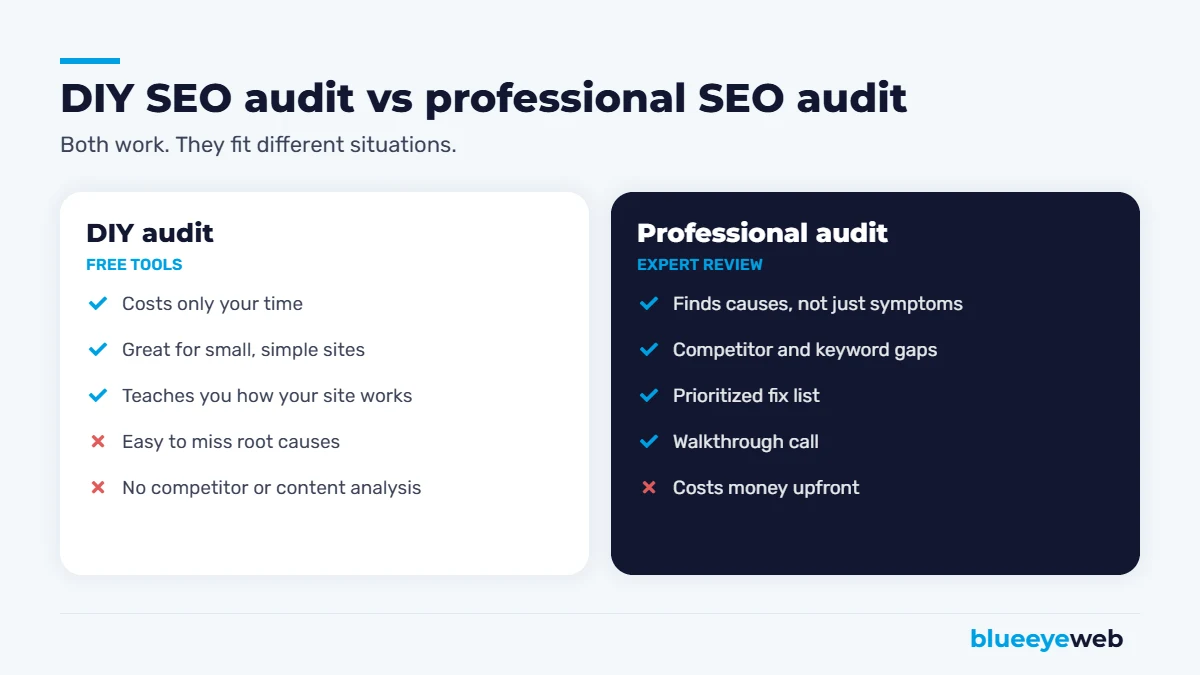
You can cover a lot of this list on your own with the free tools above. A professional audit makes sense when your site is large, when traffic dropped and you can’t find out why, when you’re in a competitive industry, or when you’d rather spend your time running the business. It’s also worth getting an outside opinion before a redesign, so you know which pages and rankings to protect.
Whichever route you take, the audit is only worth something if it turns into action. Put every finding into a simple spreadsheet with four columns: the issue, the page it affects, the priority and who will fix it. Then block time on the calendar to work through it. Re-run the key checks a month later to confirm the fixes worked, and keep the original audit as your baseline. Six months from now, you’ll want to compare indexed pages, Core Web Vitals, rankings and leads against where you started, so you can see what the work actually changed.
A professional SEO audit for a small business typically costs from a few hundred dollars for a focused review to a few thousand for a large site with a full content and competitor analysis. The best audits include a call to walk you through the findings, not just a report. If you’re unsure whether ongoing SEO is worth it after the audit, read our honest take on whether SEO is worth it.
Want a second set of eyes on your website?
We’ll run a full SEO audit covering technical health, content, local signals and AI visibility, then walk you through a prioritized fix list on a call.
Frequently Asked Questions
An SEO audit is a review of your website and online presence that finds issues affecting your search rankings, including technical problems, content gaps, local signals and backlinks, and turns them into a prioritized fix list.
A full audit once a year is a good baseline. Also run one before and after a redesign, after a sudden traffic drop, and when starting a new SEO campaign. Check Google Search Console monthly.
Yes. Google Search Console, PageSpeed Insights, the Rich Results Test and the free version of Screaming Frog cover most of what a small business site needs.
A basic audit of a small business site can take a few hours. A thorough audit of a larger site with competitor and content analysis can take one to two weeks.
For small businesses, professional SEO audits typically range from a few hundred dollars for a focused review to a few thousand for a large site with full competitor and content analysis.
Start with anything that blocks indexing or breaks pages, then fix speed, titles and content on your most important service pages. Leave minor issues for later.