If your leads live in a mix of email threads, sticky notes, text messages and a spreadsheet only one person understands, you’re almost certainly losing business. Not because people don’t want to buy, but because nobody followed up at the right time.
A CRM fixes that. But with hundreds of options, choosing the best CRM for small business can feel like a project in itself. In this guide, we’ll compare six popular options honestly, explain what features actually matter, and show you how to set one up so your team will actually use it.
The short version
- A CRM for small business keeps every lead, customer and conversation in one place and reminds you to follow up.
- For most small teams, HubSpot, Zoho CRM and Pipedrive are the safest starting points. Salesforce fits complex needs, Freshsales and monday CRM fit budget and simplicity.
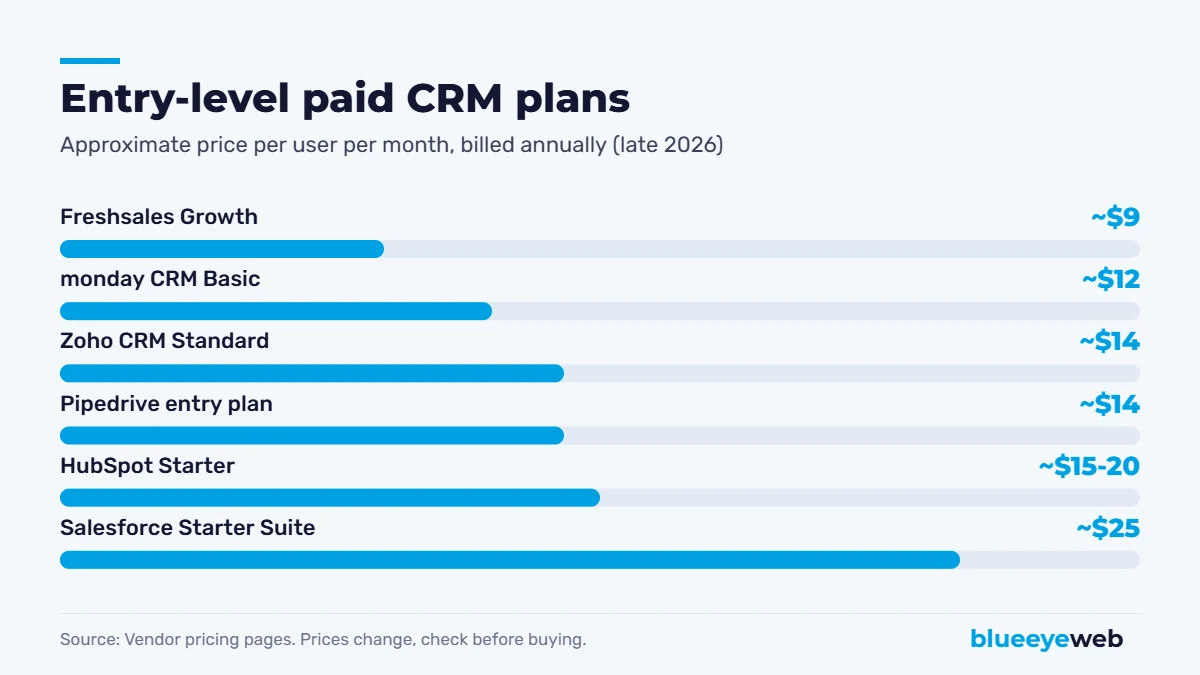
- Entry plans typically cost about $9 to $25 per user per month, and several have free plans.
- The best CRM is the one your team uses every day. Keep the setup simple and automate follow-ups first.
What Is a CRM and Why Does a Small Business Need One?
CRM stands for customer relationship management. A CRM is software that stores your contacts, tracks every interaction (calls, emails, meetings, quotes) and shows where each deal stands in your sales process.
For a small business, the value is simple: fewer leads fall through the cracks. When a quote request comes in at 9 p.m., the CRM logs it, assigns it, reminds someone to call in the morning and keeps the history so anyone on the team can pick it up. Research firm Nucleus Research famously found that CRM returned $8.71 for every dollar spent. That study is from 2014 and results vary widely, but the core idea holds: organized follow-up turns into revenue.
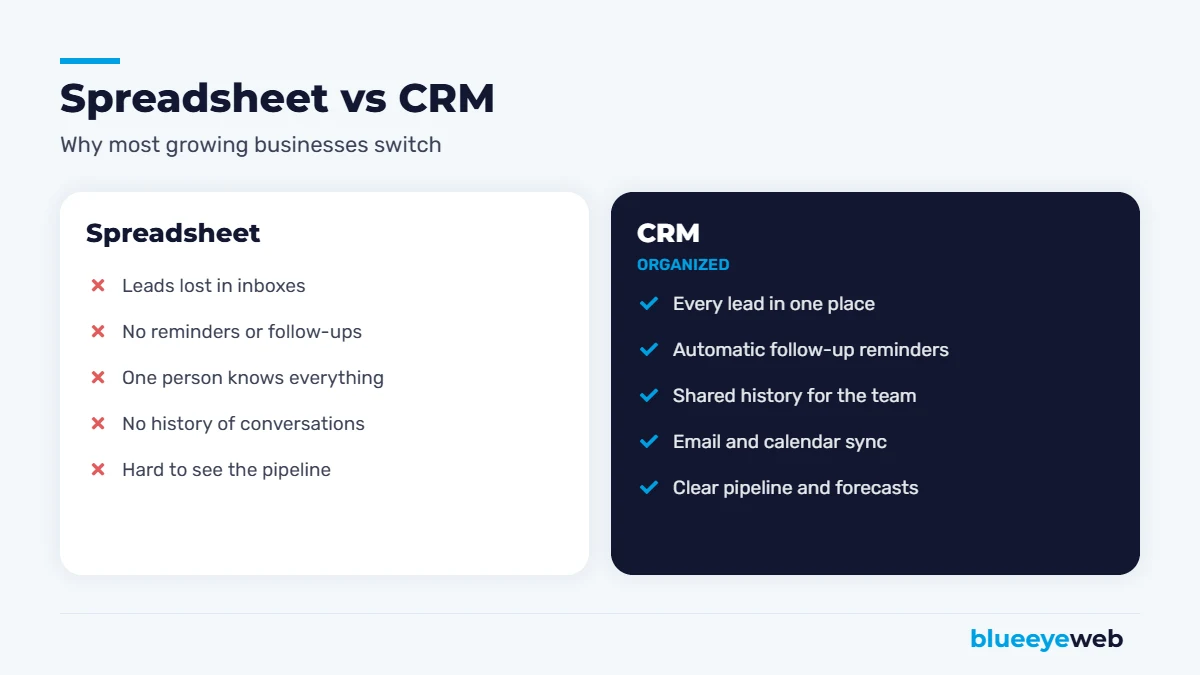
Signs You’ve Outgrown Spreadsheets
- You’ve forgotten to follow up with a lead who later bought from a competitor.
- Only one person knows the status of each customer.
- You can’t quickly answer “how many deals are in progress and what are they worth?”
- Leads come from several places (website forms, calls, ads, referrals) and nobody tracks which source works.
- You send the same follow-up emails by hand, over and over.
What to Look for in a Small Business CRM
Ease of use
This matters more than any feature list. A powerful CRM your team avoids is worth nothing. Look for a clean interface, a good mobile app and a setup you can understand in an afternoon.
Pipeline view
A visual board showing deals by stage (new lead, contacted, quote sent, won, lost) makes it easy to see what needs attention today.
Email and calendar integration
Two-way sync with Gmail or Outlook logs conversations automatically, so nobody has to copy and paste emails into the CRM.
Website form and ad integration
Leads from your website, landing pages and ads should flow straight into the CRM with their source attached. That’s how you learn which marketing actually brings customers.
Automation
Automatic tasks, reminders and follow-up emails are where a CRM pays for itself. Even simple rules, like “if a quote isn’t accepted in three days, remind the salesperson,” make a big difference.
Reporting
You should be able to see leads by source, conversion rates by stage, revenue won and how long deals take.
Price that scales
Most CRMs charge per user per month. Check what features sit behind higher tiers, because automation and reporting are often the first things locked away.
Best CRM for Small Business: 6 Options Compared
Here’s how six popular choices compare. Prices below are approximate entry-level paid plans, billed annually, as listed by the vendors in late 2026. CRM pricing changes often, so always check the current pricing page before you buy.
| CRM | Free plan | Entry paid plan (approx.) | Best for |
|---|---|---|---|
| HubSpot | Yes | About $15-20 per seat/month | Easiest all-in-one with marketing tools |
| Zoho CRM | Yes, up to 3 users | About $14 per user/month | Best value and customization |
| Pipedrive | No (free trial) | About $14 per user/month | Simple, visual sales pipelines |
| Salesforce | No (free trial) | About $25 per user/month | Complex sales and future growth |
| Freshsales | Yes, small teams | About $9 per user/month | Budget teams with built-in phone |
| monday CRM | No (free trial) | About $12 per seat/month (minimum seats) | Teams already using monday.com |
1. HubSpot CRM
HubSpot is the most common recommendation for small businesses, and for good reason. The free CRM is genuinely useful: contacts, deals, tasks, email tracking and forms. The paid Starter plans add automation, more email features and removed branding. It’s also easy to connect marketing, sales and service in one place.
Watch out for: costs climb fast at the Professional tier, which is where advanced automation lives.
2. Zoho CRM
Zoho CRM offers a lot for the price, including a free plan for up to three users and affordable paid tiers with workflow automation. It’s very customizable and fits nicely if you use other Zoho apps for email, books or projects.
Watch out for: the interface feels busier than some competitors, and getting the most out of it takes setup time.
3. Pipedrive
Pipedrive was built by salespeople for salespeople. Its drag-and-drop pipeline is one of the easiest to use, and it focuses on one thing: moving deals forward. Great for service businesses that quote jobs and need clear follow-up.
Watch out for: marketing features are add-ons, and two-way email sync isn’t on the cheapest plan.
4. Salesforce Starter
Salesforce is the biggest name in CRM. Its Starter Suite brings a simplified version to small businesses, with the option to grow into the full platform later.
Watch out for: it’s more than most very small teams need, and customization usually requires a consultant.
5. Freshsales
Freshsales from Freshworks is affordable, includes AI-based lead scoring and built-in phone and email, and has a free plan for small teams. A solid pick if budget is the main concern.
Watch out for: fewer integrations than HubSpot or Salesforce.
6. monday CRM
If your team already runs projects in monday.com, its CRM keeps sales in the same flexible, visual workspace.
Watch out for: seat minimums mean you pay for several users even if you’re a team of one or two.
Which CRM Should You Choose?
- Just starting, want free: HubSpot free or Zoho CRM free.
- Service business that quotes jobs: Pipedrive or HubSpot Starter.
- Tight budget, need automation: Zoho CRM Standard or Freshsales.
- Marketing and sales in one place: HubSpot.
- Complex sales, planning to scale: Salesforce.
- Already use monday.com: monday CRM.
Try before you commit: run two finalists side by side for a week using real leads. The one your team opens without being reminded is your answer.
One more practical point: whichever tool you pick, make sure you can export all your data at any time. Contacts, deals, notes and email history are business assets. If you ever switch platforms, a clean export saves weeks of work and protects years of customer relationships.
The Best CRM for Small Business Depends on How You Sell
The “best” CRM changes with your business model. Here’s how we think about it for the clients we work with.
Home and local services
Roofers, HVAC companies, cleaners and contractors live on quick replies and quotes. You need a mobile app, a simple pipeline, call and text logging and automatic reminders when an estimate goes quiet. Pipedrive and HubSpot Starter fit well, and many trade-specific tools like Jobber or Housecall Pro include CRM features alongside scheduling and invoicing.
Professional services
Accountants, lawyers, consultants and agencies have longer relationships and fewer, larger deals. Look for good email sync, notes, document sharing and a clear history of every conversation. HubSpot and Zoho CRM handle this nicely.
E-commerce and online businesses
For stores, the CRM is mostly about customers, not deals. Integration with your store platform, purchase history, segments and email marketing matter most. Many stores pair their platform with an email marketing tool and only add a full CRM when they sell B2B or wholesale.
What a CRM Really Costs Beyond the License
The monthly price per user is only part of the picture. Budget for setup time or a consultant, data cleanup and import, integrations with your website, phone system and accounting software, and training for your team. Add-ons like extra contacts, marketing emails or AI features can also raise the bill as you grow.
None of that means a CRM isn’t worth it. It means you should compare the total cost for your team size over a year, not just the cheapest plan on the pricing page. A $15 plan that needs five paid add-ons can easily cost more than a $25 plan that includes what you need. When you weigh the best CRM for small business options this way, the right choice usually becomes obvious.
How to Set Up a CRM So Your Team Actually Uses It
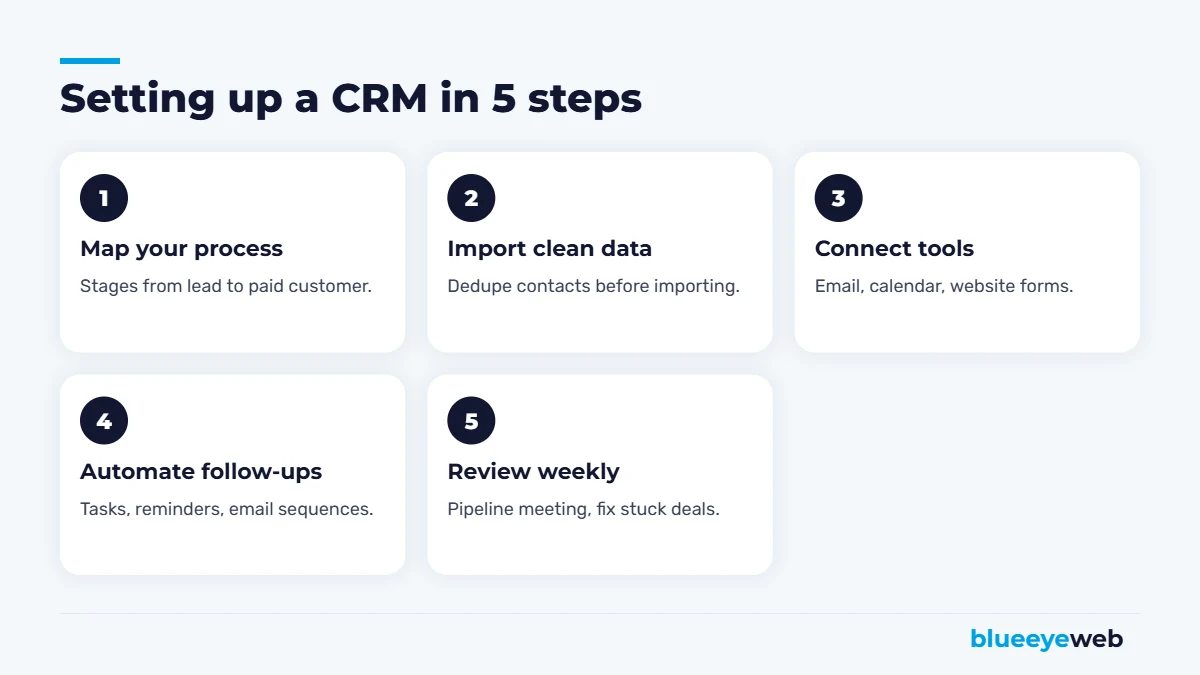
- Map your sales process first. Write down the stages a lead goes through, from first contact to paid customer. Use those exact stages in the CRM.
- Clean your data before importing. Remove duplicates, fix names and add the lead source where you know it. Importing a mess just moves the mess.
- Connect email, calendar and website forms. The less manual entry, the more people will use it.
- Automate follow-ups. Start with three rules: a task for every new lead, a reminder when a quote goes quiet and a welcome email for new customers.
- Review the pipeline weekly. A short weekly meeting around the CRM makes it part of how the business runs, not an extra chore.
CRM and AI: Faster Follow-Up
Speed matters. The business that replies first often wins the job. Modern CRMs now include AI features that summarize conversations, suggest next steps and draft follow-up emails. Connected to your website, an AI assistant can respond to new leads within seconds, qualify them and book appointments directly into your calendar, then log everything in the CRM.
That’s exactly what our AI lead follow-up and AI workflow automation services set up for small businesses. Pair them with email automation and you have a follow-up system that works even when you’re on a job site. For more tools worth using, see our list of the best AI tools for small business.
Common CRM Mistakes to Avoid
- Buying the biggest plan first. Start small and upgrade when you hit real limits.
- Too many custom fields. If a form takes two minutes to fill, nobody will fill it.
- No owner. Someone must be responsible for keeping the CRM clean and useful.
- Not tracking lead source. Without it, you can’t tell which marketing works.
- Treating it as a database, not a habit. The value comes from daily use, not from having the software.
Want a CRM that follows up for you?
We help small businesses choose, set up and automate their CRM, connected to their website, forms, email and AI follow-up, so no lead gets forgotten.
Frequently Asked Questions
For most small businesses, HubSpot, Zoho CRM and Pipedrive are the safest starting points. HubSpot is easiest for marketing and sales together, Zoho offers the best value and Pipedrive has the simplest sales pipeline.
Yes. HubSpot offers a free CRM, Zoho CRM is free for up to three users and Freshsales has a free plan for small teams. Free plans usually limit automation and reporting.
Entry-level paid plans typically cost about $9 to $25 per user per month billed annually. More advanced plans with automation and reporting can cost $50 to $150 or more per user per month.
If you have a handful of long-term clients, a spreadsheet may be enough. Once you handle regular new leads, quotes or several team members, a CRM quickly pays for itself through better follow-up.
A basic setup with your pipeline stages, imported contacts and email integration can be done in a day or two. Automations and integrations usually take one to three weeks to refine.
Yes. Most CRMs connect to website forms, chat widgets and landing pages so new leads are created automatically with their source attached.