Every week there’s a new “must-have” AI app. Most small business owners we talk to in Boynton Beach have tried ChatGPT, maybe written a few emails with it, and then wondered what all the fuss is about. Fair enough. The trick with AI tools for small business isn’t using more of them. It’s picking the few that solve a real problem you have right now.
So this list is organized by job, not by hype. For each tool, we explain what it’s good for, who it’s best for, and what to watch out for. We use most of these ourselves or set them up for clients.
The short version
- Start with one problem, like missed calls, slow replies or admin time, not with a tool.
- The fastest wins are usually lead follow-up, a website assistant and writing help.
- Keep a human in the loop for anything customers see.
- Measure hours saved and leads answered, not how “cool” the tool is.
How Small Businesses Are Really Using AI Tools
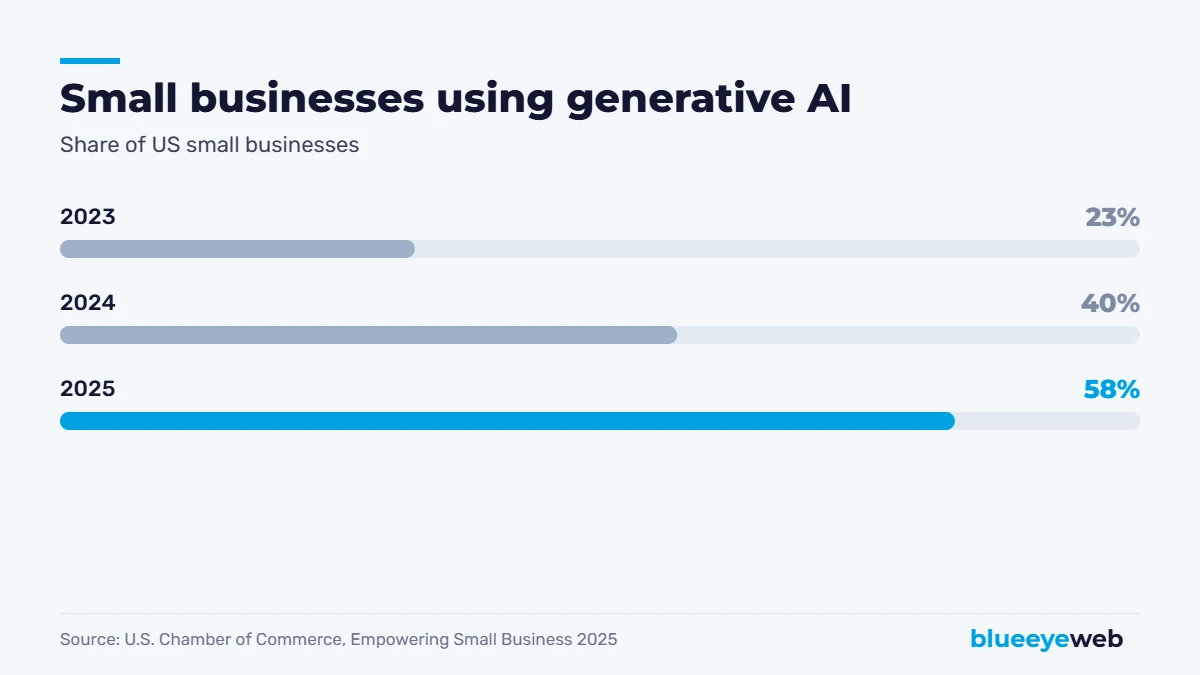
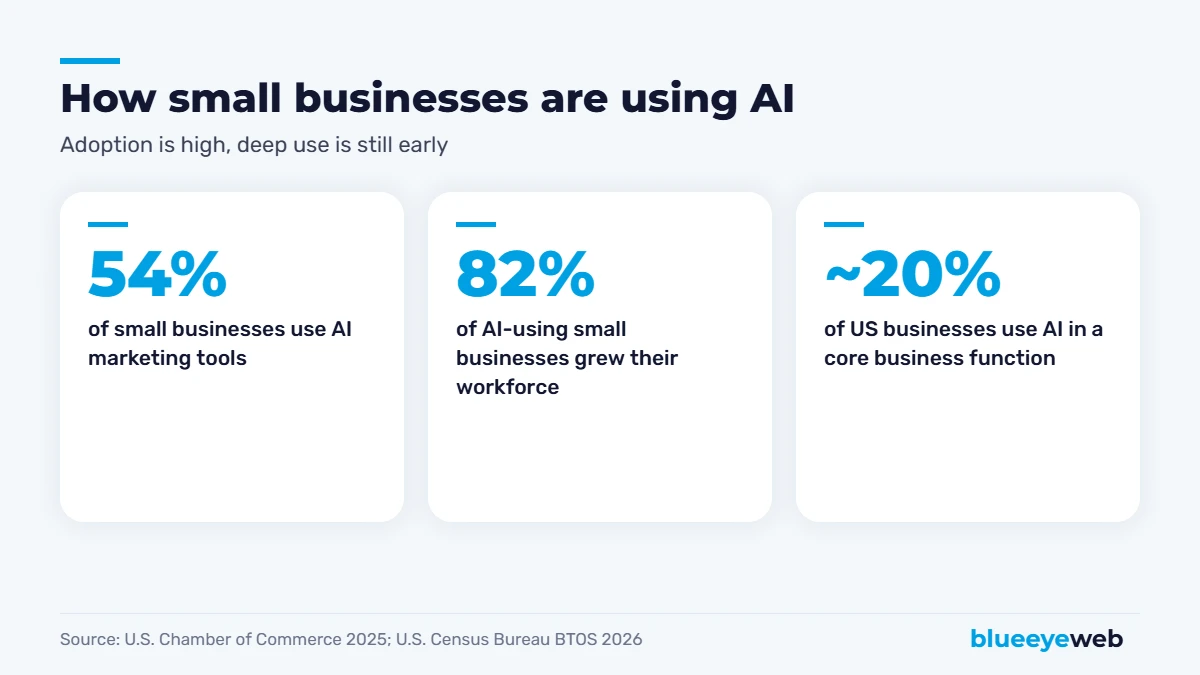
Adoption has exploded. The U.S. Chamber of Commerce’s 2025 Empowering Small Business report found 58% of small businesses use generative AI, up from 40% in 2024 and 23% in 2023. 54% already use AI marketing tools, and 82% of AI-using small businesses said they grew their workforce in the past year. So far, AI is helping small teams do more, not replacing them.
But there’s a gap between trying AI and running your business with it. The US Census Bureau’s Business Trends and Outlook Survey, which uses a stricter definition, found only about 17% to 22% of US businesses used AI in a core business function between December 2025 and July 2026. In other words, most of your competitors are experimenting, but few have built AI into how they actually work. That’s your opening.
12 Best AI Tools for Small Business, by Job
We’ve grouped these AI tools for small business into four jobs: customer service and leads, writing and marketing, admin and operations, and visibility. You don’t need all twelve. Most businesses get the biggest return from two or three, picked for the problem that costs them the most today.
Customer Service and Leads
1. An AI website assistant
A chat assistant on your website that answers common questions 24/7, collects contact details and books appointments. Trained on your services, prices and policies, it handles the “do you serve Delray Beach?” and “how much does it cost?” questions while you sleep. This is our AI Website Assistant service.
Best for: businesses that get the same questions every day and lose leads after hours.
2. AI lead follow-up and missed-call text back
When a new inquiry comes in, or you miss a call, the system replies within seconds by text or email, asks a few qualifying questions and books a time. Speed matters: the business that replies first usually wins the job. See AI lead follow-up.
Best for: service businesses that miss calls on the job site or reply hours later.
3. A CRM with built-in AI
Tools like HubSpot now summarize conversations, draft follow-up emails and suggest next steps for each deal. If you already use a CRM, switch on its AI features before buying anything new.
Best for: businesses with a steady pipeline of quotes and proposals.
Writing, Marketing and Content
4. A general AI assistant (ChatGPT, Claude or Gemini)
The Swiss Army knife of AI tools for small business: drafting emails, summarizing documents, brainstorming offers, rewriting website text, answering “how do I…” questions. Most have free plans, with paid plans typically around $20 a month per user.
Best for: owners and small teams who write a lot.
5. AI design tools (like Canva’s AI features)
Quick social posts, flyers, ad images and presentation slides from a simple prompt, using your brand colors and fonts.
Best for: businesses without an in-house designer.
6. AI writing and grammar checkers
Tools like Grammarly catch mistakes and tone problems in emails, proposals and website text before customers see them.
Best for: anyone who writes to customers every day.
7. AI features inside ad platforms
Google Ads and Meta both use AI to write ad variations, pick audiences and adjust bids. They’re powerful, but they spend money fast if your tracking is wrong, so set up conversions properly first. Our Google Ads and Meta ads services start there.
Best for: businesses already running paid ads.
Admin, Operations and Productivity
8. AI in your email and documents
Microsoft 365 Copilot and Gemini for Google Workspace summarize long email threads, draft replies, turn notes into documents and pull numbers from spreadsheets.
Best for: teams that live in email and documents all day.
9. AI meeting notes
Tools like Otter or Fireflies record calls (with permission), write summaries and pull out action items, so nothing falls through the cracks.
Best for: anyone with lots of client calls or team meetings.
10. Workflow automation with AI steps
Zapier, Make and similar tools connect your forms, CRM, invoicing and email, and can add AI steps like “summarize this inquiry” or “sort this lead by urgency.” This is the backbone of our AI workflow automation service.
Best for: businesses that copy and paste the same information between systems.
11. AI in your accounting software
Accounting platforms now use AI to categorize transactions, flag unusual expenses and draft invoice reminders. Turn these features on, but keep your bookkeeper or accountant reviewing the results.
Best for: owners who spend evenings on bookkeeping.
Visibility and SEO
12. AI search visibility tracking
More customers now ask ChatGPT and Google’s AI for recommendations. AI visibility tools and audits check whether you’re mentioned, what AI says about you, and which competitors appear instead. It’s the core of our AI search optimization work, and our guide on showing up in ChatGPT and AI search explains the steps.
Best for: any business that relies on being found online.
Don’t stack tools. Five overlapping AI subscriptions cost more and save less than two that are set up properly. Check what your existing software (email, CRM, accounting, website) already includes before you buy anything new.
What Do AI Tools for Small Business Cost?
| Type | Typical cost | Setup effort |
|---|---|---|
| General AI assistants | Free, or around $20/user/month | Minutes |
| AI inside tools you already use | Often included or a small add-on | Low |
| Design, writing and meeting tools | Free plans to a few dozen dollars a month | Low |
| Automation platforms | Free tiers, then usage-based plans | Medium |
| Custom AI assistant, lead follow-up and workflows | $5,000 to $20,000 to implement (our range), plus running costs | Done for you |
For custom AI implementation, our projects typically range from $5,000 to $20,000, depending on how many systems need to connect and how much the assistant needs to know. Many businesses start with one focused piece, like lead follow-up, and expand once it pays for itself.
How to Pick the Right AI Tools for Small Business
- List your biggest time sinks. Where do hours disappear every week?
- List where leads slip away. Missed calls, slow replies, forgotten follow-ups?
- Check what you already pay for. Your CRM, email or accounting tool may already have AI built in.
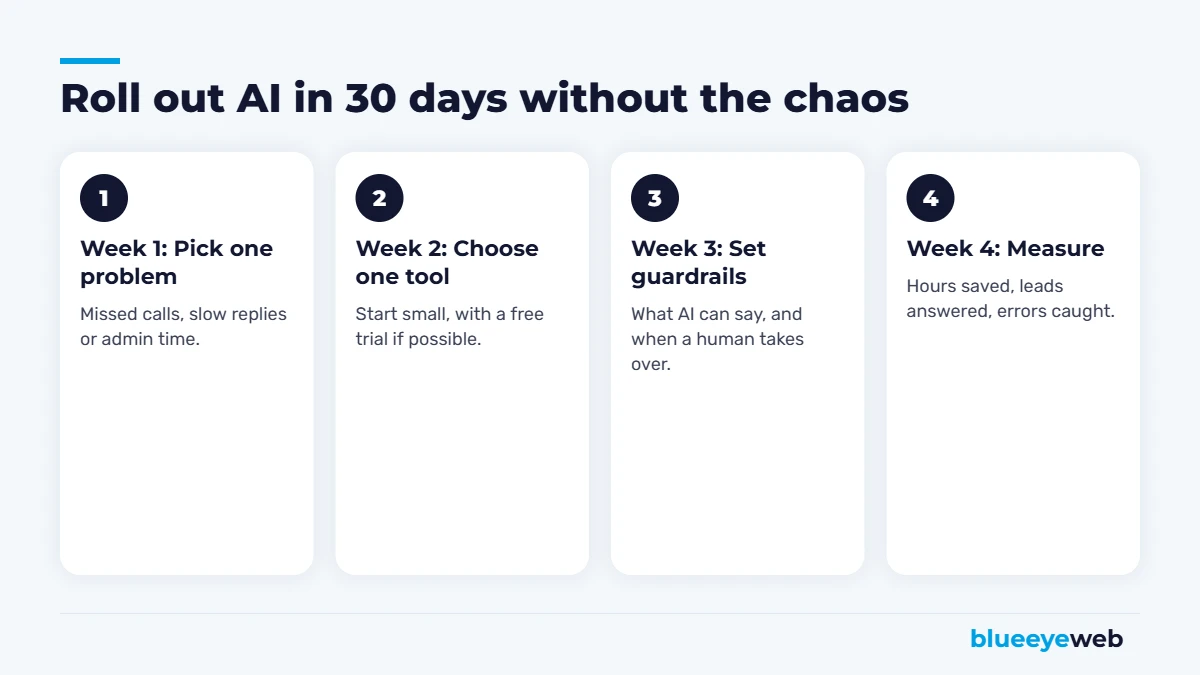
- Pick one problem and one tool. Run it for 30 days.
- Measure and decide. Keep it, tweak it or drop it.
Where AI Tools Go Wrong (and How to Avoid It)
- Made-up facts. AI writing tools can invent prices, statistics or claims. A person should check anything customers see.
- Generic content. AI-written marketing that sounds like everyone else won’t win customers or rankings. Add your real experience, prices and results.
- Chatbots without guardrails. A website assistant must know when to hand off to a human and must never promise what you can’t deliver.
- Customer data in free apps. Use business-grade tools and don’t paste sensitive customer information into free consumer apps.
- Automating a broken process. If your follow-up process is a mess, AI just makes the mess faster. Fix the process first.
AI Tools for Small Business by Industry
The right AI tools for small business depend a lot on what you do. Here’s where we see the quickest wins in the industries we work with most:
| Industry | Quickest AI win | Why it works |
|---|---|---|
| Contractors and home services | Missed-call text back and AI lead follow-up | Owners are on job sites and can’t answer every call |
| Medical, dental and wellness | Website assistant for FAQs and appointment requests | Front desks are swamped with the same questions |
| Restaurants and hospitality | Review replies and social content drafts | Reviews and posts never stop, staff time is limited |
| E-commerce | Product descriptions, customer service replies, order updates | Hundreds of products and repetitive questions |
| Professional services | Meeting notes, proposal drafts and CRM follow-ups | Lots of calls and documents, little admin help |
A medical office should be extra careful with privacy and keep patient details out of general AI tools. Contractors, on the other hand, can often get value in days with something as simple as an automatic text reply to every missed call.
What AI Tools for Small Business Can’t Do
It helps to be clear about the limits. AI tools for small business won’t build relationships with your best customers, make judgment calls on unusual jobs, or know your local market the way you do. They won’t fix a weak offer or poor service either. Think of AI as a very fast assistant that never gets tired: great at drafts, summaries, replies and repetitive work, but still needing direction and a final check from someone who knows the business.
The businesses getting the most out of AI tools for small business aren’t the ones using the most tools. They’re the ones that pointed one or two tools at a real problem, set clear rules, and kept improving them month after month.
Our Recommendation
If you’re just starting with AI tools for small business, do three things: use a general AI assistant for writing and research, turn on the AI features in tools you already pay for, and fix your lead response time with an AI lead follow-up or website assistant. That combination usually saves the most time and wins the most customers for the least money.
Want the full picture of what we do with AI? See our AI solutions page. And if you’re wondering whether AI can build your website too, read AI website builder vs web designer.
Not sure where AI fits in your business?
We’ll look at how you handle leads, follow-up and admin today and show you the one or two AI tools that would save the most time. Free, no obligation.
Frequently Asked Questions
The tools that usually save the most time are an AI website assistant, AI lead follow-up or missed-call text back, a general AI assistant like ChatGPT, Claude or Gemini, AI features inside your CRM, email and accounting software, and workflow automation tools like Zapier or Make.
Many general AI assistants have free plans, with paid plans typically around $20 per user per month. AI features in tools you already use are often included. Custom AI assistants and automations usually cost $5,000 to $20,000 to implement, depending on scope.
The U.S. Chamber of Commerce found 58% of small businesses used generative AI in 2025. The US Census Bureau, using a stricter definition, found about 17% to 22% of businesses used AI in a core business function in 2026.
So far, the data suggests the opposite for small businesses. The U.S. Chamber found 82% of AI-using small businesses grew their workforce in the past year. AI mostly takes over repetitive tasks so people can focus on customers and higher-value work.
Use business-grade tools with clear data policies, avoid pasting sensitive customer information into free consumer apps, and keep a person reviewing anything that goes to customers.
Start with one clear problem, such as missed calls, slow lead replies or admin time. Pick one tool to fix it, run it for 30 days and measure the hours saved or leads answered before adding more.
Sources
- U.S. Chamber of Commerce: Empowering Small Business, The Impact of Technology on U.S. Small Business (August 2025)
- US Census Bureau: AI use at US businesses (BTOS, 2026)
- Public product information from OpenAI, Anthropic, Google, Microsoft, HubSpot, Canva, Grammarly, Zapier and Make, 2026