You do great work. Customers tell you so in person. But when someone in Boynton Beach searches for what you do, your competitor with 180 Google reviews shows up first and gets the call. Sound familiar?
The good news: getting more Google reviews isn’t about luck or begging. It’s a simple system: ask at the right moment, make it one tap, and reply to everything. Below are 12 proven ways to do it, plus copy-and-paste templates you can use today. Everything here follows Google’s policies and the FTC’s rules, so you won’t put your listing at risk.
The short version
- Ask every customer, right after the job, with your direct review link.
- Make it easy: text message, QR code, email signature.
- Follow up once, then let it go.
- Reply to every review, good and bad.
- Never buy reviews, offer rewards or only ask happy customers.
Why Google Reviews Matter So Much in 2026
Google reviews do two jobs at once. They help you rank, and they help you win the customer once you do. BrightLocal’s 2026 Local Consumer Review Survey of 1,002 US adults shows how high the bar has gotten:
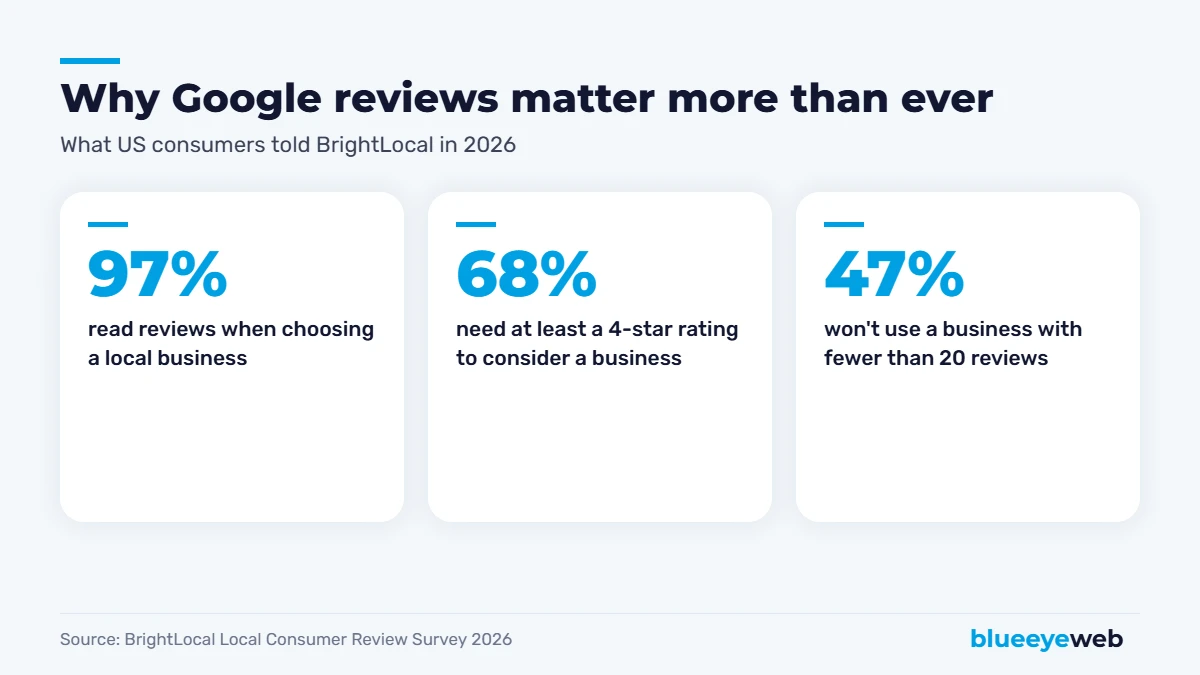
- 97% of consumers read reviews for local businesses, and 41% “always” read them, up from 29% a year earlier.
- 68% need at least a 4-star rating to even consider a business, up from 55%.
- 47% won’t use a business with fewer than 20 reviews.
- 54% visit a business’s website after reading positive reviews.
On the ranking side, review signals make up about 20% of Google map pack ranking weight in Whitespark’s 2026 Local Search Ranking Factors, second only to your Google Business Profile itself. And BrightLocal’s 2026 search behavior research found 65% of consumers who rejected a business did so for a review-related reason: negative reviews, a low rating, or no recent reviews at all.
Recency matters too. BrightLocal’s 2026 headline was literally “old reviews don’t cut it.” A profile with 150 Google reviews, the newest from 2023, can lose to one with 40 reviews from the last few months.
12 Proven Ways to Get More Google Reviews
1. Just ask, every single time
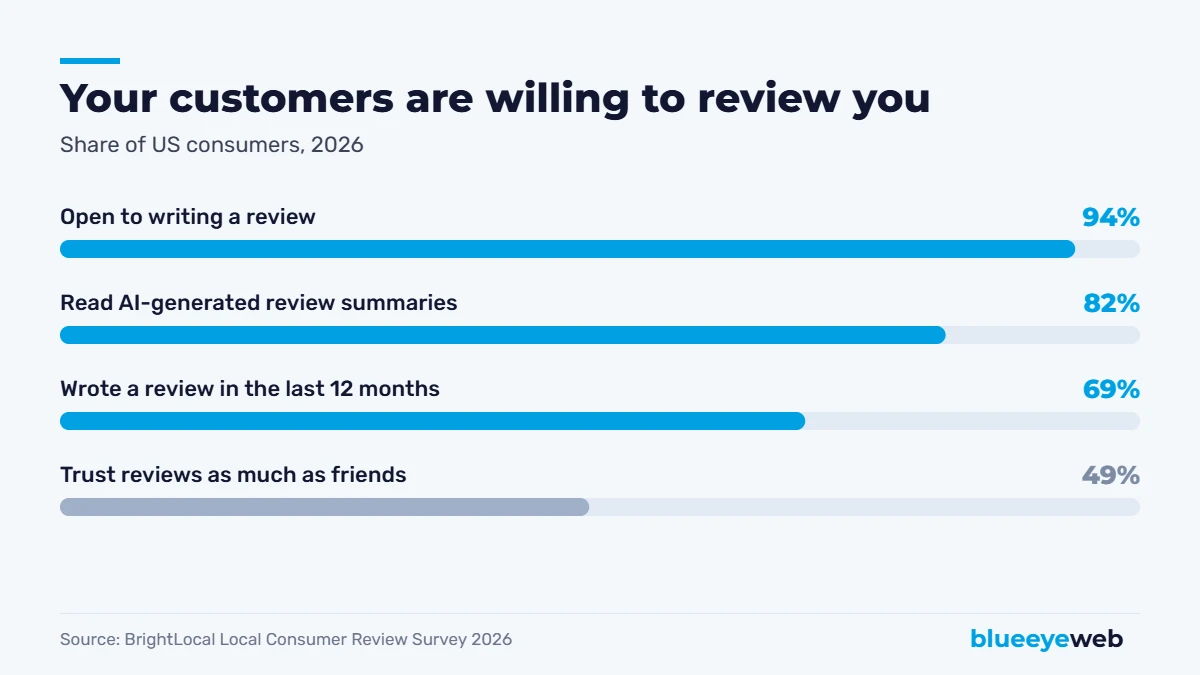
It sounds too simple, but most businesses with few Google reviews simply don’t ask. BrightLocal found 69% of consumers wrote a review in the last year, and 94% say they’re open to writing one. Your customers are willing. They just need a nudge.
2. Ask at the happiest moment
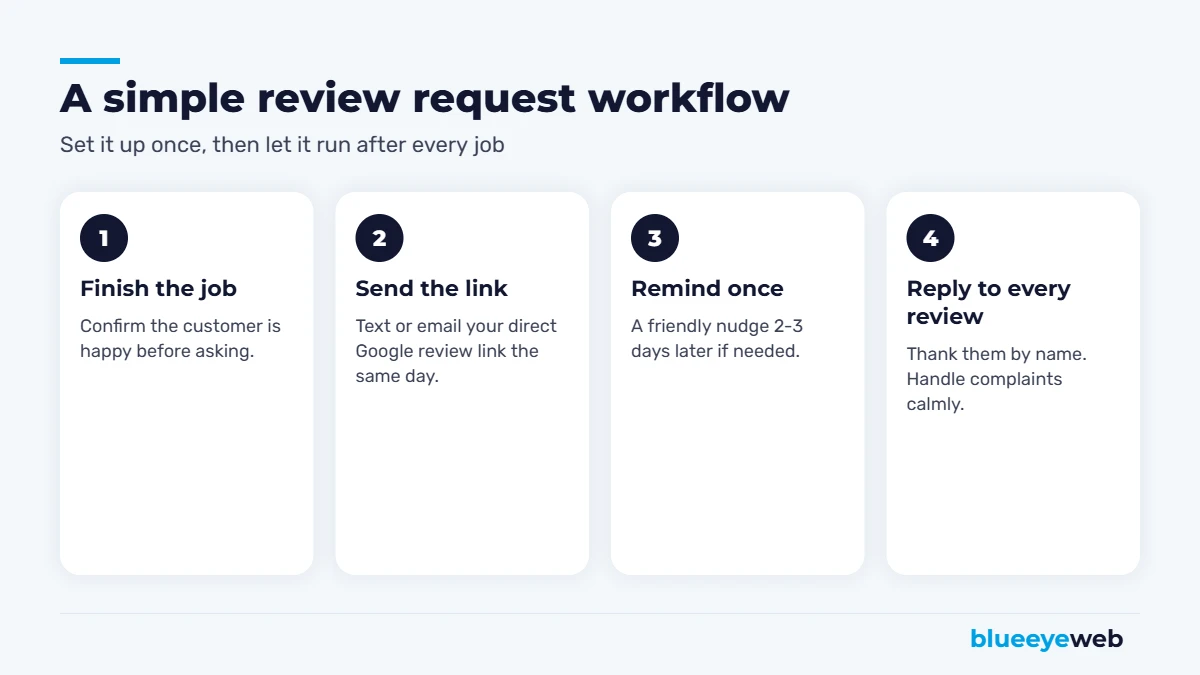
Timing is everything. Ask when the roof is done and looks great, right after the cleaning, or when the customer says “thank you so much.” Two weeks later, they’ve moved on.
3. Use your direct review link
Don’t make people search for you. In your Google Business Profile, click “Ask for reviews” to get a short link that opens the review box directly. Save it somewhere you can paste it fast.
4. Send it by text message
Text messages get read. A short, friendly text with your link right after the job is the single most effective method we see. (Template below.)
5. Add a QR code where customers already are
Print your review QR code on invoices, receipts, business cards, your counter, or a small sticker in the service van. One scan, and they’re writing.
6. Put the link in your email signature and receipts
A small “Happy with our work? Leave us a Google review” line at the bottom of every email quietly adds up over hundreds of messages.
7. Follow up once, politely
If they don’t leave a review, send one friendly reminder two or three days later. Then stop. One reminder helps; three feels pushy.
8. Train your team to ask
Your technicians, stylists and front-desk staff see customers at their happiest. Give them a simple script and make it part of finishing every job.
9. Automate the asking
The most reliable way to get more Google reviews is to take memory out of it. Set up an automatic text or email after each completed job or paid invoice. Our AI lead follow-up and email automation services can do this for you, so every customer gets asked without anyone having to remember.
10. Reply to every review
Replies show you care, and future customers read them. Thank people by name, mention the service if it fits naturally, and keep it short. Replies also signal to Google that your profile is active.
11. Handle negative reviews the right way
A bad review isn’t the end of the world. A calm, helpful public reply often wins more trust than the review costs you. Apologize for the experience, take the details offline, and fix it if you can.
12. Show off your reviews
Add your best Google reviews to your website, near your contact form and on your service pages. Customers trust what other customers say far more than anything you say about yourself.
Copy-and-Paste Review Request Templates
Text message (best response rate)
“Hi Maria, thanks for choosing [Business] today! If you were happy with the work, would you mind leaving us a quick Google review? It really helps a small local business like ours: [link]. Thank you! – Mike”
Subject: Quick favor?
“Hi Maria, thanks again for trusting us with your [service]. If you have 30 seconds, a Google review would mean a lot to our team and helps neighbors find us: [link]. If anything wasn’t perfect, just reply to this email and we’ll make it right.”
Reply to a positive review
“Thank you, Maria! We loved working on your kitchen in Boynton Beach and we’re thrilled it turned out the way you pictured. Enjoy it, and we’re here whenever you need us.”
Reply to a negative review
“Hi James, we’re sorry your appointment didn’t go the way it should have. That’s not the experience we want for anyone. Please call me directly at [number] so I can understand what happened and make it right. – Sarah, Owner”
What Not to Do (Seriously)
These can get your reviews removed or your profile suspended:
- Buying reviews or posting fake ones. The FTC’s rule banning fake reviews took effect in 2024 and allows civil penalties. Google also removes suspicious reviews in bulk.
- Offering rewards for reviews. Discounts, gift cards or entries into a drawing in exchange for reviews break Google’s policies.
- Review gating. Asking only happy customers, or filtering people through a “were you happy?” survey first, is against Google’s rules. Ask everyone.
- Asking employees or family to review you. Reviews must come from real customers.
- Reviewing competitors. Obviously not, but it happens.
How to Ask for Google Reviews in Different Industries
The basics are the same everywhere, but the best moment and method change a bit depending on what you do.
Contractors and home services
Ask on the final walkthrough, when the customer is looking at the finished work. Then text the link the same evening. Photos help: “Here’s a before-and-after of your new deck, and here’s our review link if you have a minute.”
Restaurants and cafes
A QR code on the receipt or table tent works better than asking directly. Train servers to mention it casually when guests compliment the food.
Medical, dental and wellness practices
Use an automated text or email after the visit, and keep it general. When replying, never confirm someone is a patient or mention treatment details, even if they did in their review. Privacy rules like HIPAA apply to your replies too.
Salons, spas and personal services
Ask at checkout while the client is admiring the result in the mirror, then send the link by text. Regular clients are your best reviewers, so don’t forget to ask them too.
Professional services (lawyers, accountants, consultants)
Ask at the end of an engagement or after a milestone, by email from the person who did the work. A personal note gets far more Google reviews than a generic company message.
How to Track Your Google Reviews Progress
What gets measured gets done. Once a month, write down four numbers:
| Metric | Why it matters | Good target |
|---|---|---|
| Total Google reviews | Social proof and ranking signal | 20+ first, then keep pace with top competitors |
| New reviews this month | Recency is what customers and Google watch | A steady handful every month |
| Average rating | 68% need 4 stars or more | 4.5 or higher |
| Reply rate | Shows customers you care | 100% |
If new reviews stall, check the obvious things first: is the request text still going out, is the link still working, and is your team still asking?
Do You Need a Review Management Tool?
Not at first. A saved text template, your direct link and a QR code will get most small businesses to their first 20 or 50 Google reviews. A tool starts to make sense when you have several locations, a team of technicians, or more than a few dozen customers a week. At that point, automation that sends the request after every completed job, tracks who responded and alerts you to new reviews saves real time. Just make sure any tool you use asks every customer, not only the happy ones, so you stay on the right side of Google’s rules.
How Many Google Reviews Do You Need?
There’s no magic number, but BrightLocal’s data gives a useful target: get to at least 20 Google reviews as quickly as you can, since 47% of people won’t consider a business below that. After that, focus on a steady flow of fresh reviews rather than a big total. A handful of new reviews every month beats a burst of 50 followed by silence.
Also look at your competitors. If the top three businesses in your map pack have 60 to 120 reviews each, that’s your benchmark for the next six to twelve months.
Google Reviews and AI Search
Here’s a newer reason Google reviews matter: AI tools read them. BrightLocal found 45% of consumers now use AI tools like ChatGPT to find local businesses, and 82% read AI-generated review summaries. When an AI assistant recommends “the best electrician in Delray Beach,” it often summarizes what reviews say about each option. Detailed, recent reviews that mention specific services and towns make your business easier to recommend. More on that in our guide to showing up in ChatGPT and AI search.
Your Google Reviews Action Plan for This Week
- Grab your direct review link from your Google Business Profile.
- Reply to every unanswered review, oldest first.
- Text the link to your last 10 happy customers using the template above.
- Print a QR code for your counter, invoices or vans.
- Set up an automatic request after every completed job.
Reviews are one part of local SEO. To see how they fit with everything else, read our local SEO checklist and our guide on how to get your business on Google. And if you want a done-for-you system, our local SEO service includes automated review requests and reply management.
Want more 5-star Google reviews on autopilot?
We’ll set up an automated, policy-safe review system for your business and show you how you compare to your local competitors.
Frequently Asked Questions
Ask every customer right after the job, send your direct Google review link by text message, follow up once two or three days later, and reply to every review. Automating the request after each job is the most reliable way to keep reviews coming.
No. Buying reviews or posting fake ones is banned by the FTC’s 2024 rule on fake reviews and breaks Google’s policies. Google can remove the reviews and suspend your profile.
No. Google does not allow incentives for reviews, including discounts, gift cards or prize drawings. You can thank customers after they review, but not reward them for it.
Aim for at least 20 as soon as possible, since BrightLocal found 47% of consumers will not use a business with fewer than 20 reviews. After that, a steady flow of recent reviews matters more than the total.
Yes. Replying to positive and negative reviews shows customers you care, signals an active profile to Google, and gives you a chance to fix problems publicly and calmly.
Open your Google Business Profile, click “Ask for reviews” and copy the short link. You can share it by text, email, QR code or on your website.
Sources
- BrightLocal: Local Consumer Review Survey 2026
- BrightLocal: Consumer Search Behavior 2026
- Whitespark: 2026 Local Search Ranking Factors
- US Federal Trade Commission: Rule on the Use of Consumer Reviews and Testimonials (2024)
- Google Business Profile: prohibited and restricted content policy