If you run a local business, you don’t need to know every SEO trick in the book. You need a clear list of what actually moves the needle, in the right order. That’s what this local SEO checklist is: 25 practical steps we use for clients from Boynton Beach to Delaware, grouped so you can work through them one section at a time.
Print it, bookmark it, or hand it to whoever manages your marketing. Most items take less than 30 minutes, and none of them require you to be a “tech person.”
How to use this local SEO checklist
- Start with Google Business Profile (steps 1-7). It carries the most weight.
- Then fix your website (8-13) and reviews (14-17).
- Finish with listings (18-21) and content and links (22-25).
- After that, follow the 30-minute monthly routine at the end.
Why a Local SEO Checklist Beats Random Tips
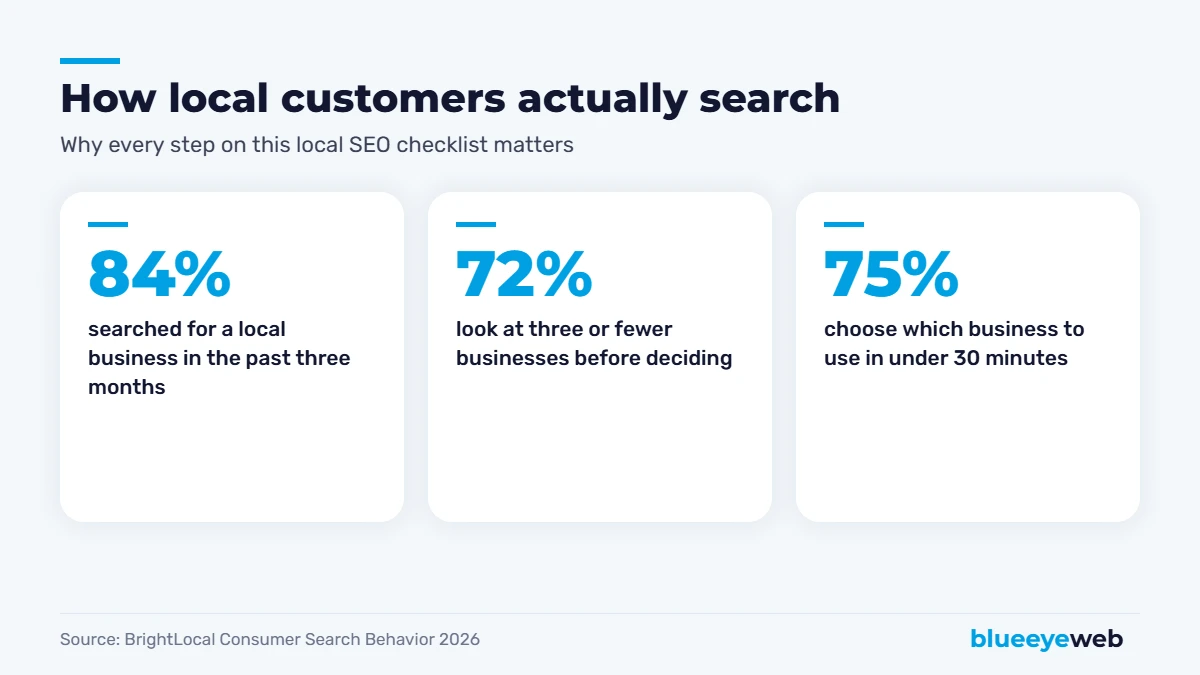
Local customers move fast. BrightLocal’s 2026 Consumer Search Behavior study found 84% of consumers searched for a local business in the past three months, 72% look at three or fewer businesses before deciding, and 75% make their choice in under 30 minutes. If you’re not in that top handful of results, you’re simply not in the running.
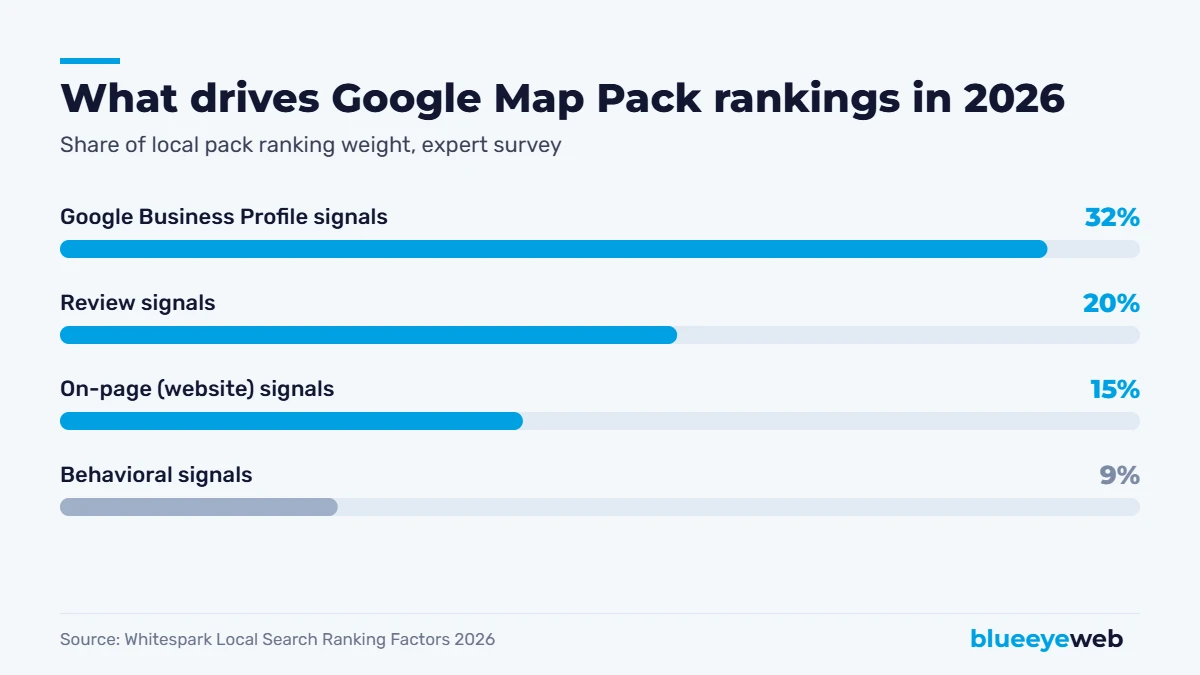
And not every task is equal. Whitespark’s 2026 Local Search Ranking Factors survey of 47 local SEO experts puts Google Business Profile signals at about 32% of map pack ranking weight, reviews at 20% and your website at 15%. This local SEO checklist follows that order on purpose: biggest wins first.
Part 1: Google Business Profile (Steps 1-7)
Your Google Business Profile is the listing that appears in Google Maps and the map pack. It’s free, and it’s the most important part of any local SEO checklist. For a deeper walkthrough, see our Google Business Profile optimization guide.
- Claim and verify your profile. Use an email you control for the long term, not an employee’s personal account or an old agency login.
- Choose the most specific primary category. It’s the number one map pack ranking factor. “Roofing contractor” beats “contractor.” Add secondary categories only for services you really offer.
- Use your real business name. No extra keywords or city names. Stuffing the name breaks Google’s guidelines and can get your profile suspended.
- Set accurate hours, including holidays. Being open at the time someone searches is now one of the top five map pack factors.
- Add every service and your service area. Write short, plain descriptions for each service. List the cities and neighborhoods you actually serve.
- Upload real photos and keep adding them. Your team, your work, your vehicles, your storefront. Real photos build trust; stock photos don’t.
- Add booking, quote or appointment links. Google retired Business Profile chat in 2024, so make it easy for people to call or book right from the listing instead.
Quick test: search your business name on your phone right now. If anything is wrong, like hours, phone number or website link, fix that before anything else on this local SEO checklist.
Part 2: Your Website (Steps 8-13)
Google cross-checks your profile against your website, and your website is what turns a curious visitor into a phone call. These steps are where on-page SEO and technical SEO come in.
- Match your name, address and phone (NAP) exactly. Put them in your footer on every page, written the same way as on your Google profile.
- Create one page per main service. “Roof repair” and “roof replacement” each deserve their own page with real details, prices or price ranges, and FAQs.
- Add location pages for the areas you serve. Write them for people, with genuine local details. Our own Boynton Beach web design page is an example.
- Add LocalBusiness schema markup. It helps search engines and AI tools read your business details accurately.
- Make it fast and mobile-first. Only 48% of mobile websites pass Google’s Core Web Vitals, according to the HTTP Archive’s 2025 Web Almanac. Being in the faster half is an easy edge.
- Put a tap-to-call button near the top. Most local searches happen on phones. Don’t make people hunt for your number.
Part 3: Reviews (Steps 14-17)
Reviews are the second-biggest ranking signal and the first thing customers read. BrightLocal’s 2026 Local Consumer Review Survey found 97% of consumers read reviews for local businesses, and 47% won’t use a business with fewer than 20 of them. Our full guide on how to get more Google reviews goes deeper; here’s the checklist version.
- Ask every customer, right after the job. The best moment is when they’re happiest, not two weeks later.
- Make it one tap. Send your direct review link by text or email, and add a QR code to invoices or your counter.
- Reply to every review within a few days. Thank the happy ones, and handle complaints calmly and publicly. Future customers read your replies.
- Never buy reviews or only ask happy customers. Fake reviews are illegal under the FTC’s 2024 rule, and “review gating” breaks Google’s policies.
Part 4: Listings and Citations (Steps 18-21)
Citations are mentions of your business name, address and phone on other sites. They confirm to Google (and AI tools) that you’re real and where you are.
- Claim Apple Business Connect. Apple Maps usage for reviews nearly doubled in BrightLocal’s 2026 survey. Every iPhone user who asks Siri for directions sees Apple’s data.
- Claim Bing Places. It powers Bing, Microsoft Copilot and some other assistants.
- Get listed on Yelp, Facebook, the BBB and your local chamber. These are trusted, high-visibility sources.
- Add industry directories. Angi or Houzz for home services, Healthgrades for medical, Avvo for legal, and so on.
Consistency beats quantity. Twenty listings with three different phone numbers do more harm than eight listings that match perfectly. Fix old addresses and numbers before adding new listings.
Part 5: Local Content and Links (Steps 22-25)
This is the part of the local SEO checklist most competitors skip, which is exactly why it works so well.
- Publish real local project pages. “Kitchen remodel in Lake Worth Beach” with photos and details beats a generic gallery every time.
- Answer the questions customers ask you. Every question you hear on the phone can become a page, a blog post or an FAQ. Our SEO content writing service does exactly this.
- Earn local links. Sponsorships, local news, suppliers, partners, community groups. One respected local link beats dozens of random directories.
- Track what’s working. Use Google Search Console and your Google Business Profile performance report. Watch calls, direction requests and website clicks, not just rankings.
Bonus: Local SEO for AI Search
Local search doesn’t stop at Google anymore. BrightLocal found 45% of consumers now use ChatGPT or other AI tools to find local businesses, up from 6% a year earlier. The good news: AI tools lean on the same signals this local SEO checklist covers, including your Google Business Profile, reviews, consistent listings and clear website content. Our guide on showing up in ChatGPT and AI search covers the extra steps.
Your Monthly Local SEO Checklist Routine
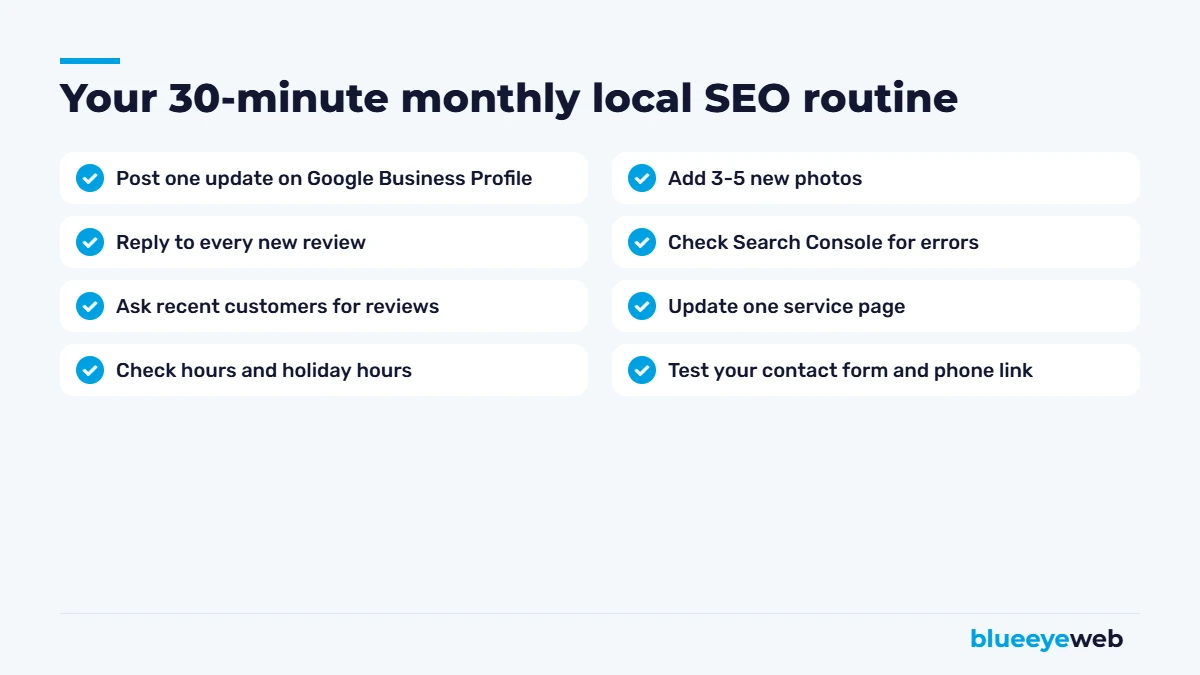
Local SEO isn’t a one-time project. Once the 25 steps are done, a short monthly routine keeps you ahead. Block 30 minutes on your calendar for the first Monday of each month and run through the list above. Consistency beats intensity: a profile that’s updated every month looks active to both Google and customers.
Free Tools to Work Through This Local SEO Checklist
- Google Business Profile: your listing, posts, photos and performance report.
- Google Search Console: which searches show your site, and any technical errors.
- PageSpeed Insights: how fast your pages load on phones.
- Rank Math or Yoast: titles, descriptions and schema on WordPress.
Putting It Into Practice: A 4-Week Plan
Twenty-five steps can feel like a lot. Here’s how we’d spread this local SEO checklist over a month for, say, a plumbing company in Boynton Beach that’s starting from scratch:
| Week | Focus | Checklist steps |
|---|---|---|
| Week 1 | Google Business Profile: claim it, fix the category, hours, services, photos and booking link | 1-7 |
| Week 2 | Website: NAP in the footer, one page per service, tap-to-call, speed check, schema | 8-13 |
| Week 3 | Reviews: set up a review request text, reply to every old review, start asking every customer | 14-17 |
| Week 4 | Listings and content: Apple, Bing, Yelp, chamber, then the first local project page | 18-25 |
After week four, switch to the monthly routine. Most of the heavy lifting is done; now it’s about staying active and consistent.
Common Local SEO Checklist Mistakes
- Skipping straight to content. Blog posts won’t help much if your Google Business Profile has the wrong category. Follow the order.
- Using a call-tracking number inconsistently. If you use one, set it up so your main number stays consistent on your profile and listings.
- One page for every service and city combined. A single “Services” page rarely ranks for anything specific.
- Ignoring negative reviews. A calm, helpful reply often wins more trust than the review costs you.
- Setting it and forgetting it. A profile that hasn’t changed in a year looks abandoned to customers and to Google.
- Chasing rankings instead of calls. Rankings are nice. Calls, bookings and direction requests pay the bills.
Local SEO Checklist for Service-Area Businesses
If you go to your customers (contractors, cleaners, mobile services) instead of them coming to you, a few items on this local SEO checklist work a little differently:
- Hide your street address on your Google Business Profile if customers don’t visit you, and set a service area instead.
- Build area pages carefully. Write genuinely useful pages for your main cities, like Boynton Beach, Delray Beach and Boca Raton, instead of copying one page 30 times with the city name swapped.
- Show local proof. Project photos and reviews that mention the towns you work in help both Google and customers.
If you have more than one physical location, each location needs its own Google Business Profile and its own page on your website, with its own reviews, hours and phone number.
How Long Until You See Results?
Profile fixes (steps 1-7) can move map rankings within a few weeks. Website, review and content work usually takes three to six months to show steady gains in competitive markets. For proof that it’s worth it, look at Iconic Roofing & Exteriors: after working through this exact local SEO checklist, their clicks from Google grew 159% year over year and their average position improved from 42 to 16.
If you’d rather hand the whole local SEO checklist to someone else, that’s what our local SEO service does, with monthly reporting on calls, clicks and rankings. And if you want the bigger picture first, start with our guide on how to get your business on Google.
Want us to run this checklist for you?
We’ll audit your Google Business Profile, reviews, listings and website against all 25 steps and show you exactly what to fix first. Free, no obligation.
Frequently Asked Questions
A local SEO checklist is a step-by-step list of tasks that help a business show up in Google Maps, the local map pack and local search results. It usually covers your Google Business Profile, website, reviews, listings, and local content and links.
According to Whitespark’s 2026 Local Search Ranking Factors, Google Business Profile signals carry the most weight at about 32% of map pack rankings, and your primary business category is the single most important factor.
Google Business Profile fixes can move map rankings within a few weeks. Website, review and content improvements usually take three to six months to show steady results in competitive markets.
Yes. Most steps on this local SEO checklist take less than 30 minutes and need no technical skills. Many businesses hire help when competitors are investing heavily, when they serve several cities, or when the website needs work.
At least monthly. Post an update, add new photos, reply to reviews and check your hours, especially before holidays.
Yes. AI tools rely heavily on the same signals: your Google Business Profile, reviews, consistent listings and clear website content.
Sources
- Whitespark: 2026 Local Search Ranking Factors
- BrightLocal: Consumer Search Behavior 2026 and Local Consumer Review Survey 2026
- HTTP Archive: Web Almanac 2025, Performance
- Client results: Google Search Console, Oct 2025 to Sep 2026 vs prior year