“Should I use WordPress or Wix?” is one of the questions we get asked the most, right behind “how much does a website cost?” And the honest answer is: it depends on what you want the website to do. The WordPress vs Wix decision (with Squarespace thrown in) really comes down to control, ownership and how much you plan to grow.
In this guide we compare all three like we would for a client sitting across the table from us in Boynton Beach. No affiliate links, no hype, just 9 differences that actually matter for a small business in 2026.
The quick answer
- WordPress is best if you want full ownership, strong SEO, integrations and room to grow.
- Wix is best if you want to build it yourself quickly and keep things simple.
- Squarespace is best for design-focused portfolios and small sites that rarely change.
- Shopify deserves a look if your whole business is selling products online.
WordPress vs Wix vs Squarespace: The Big Picture
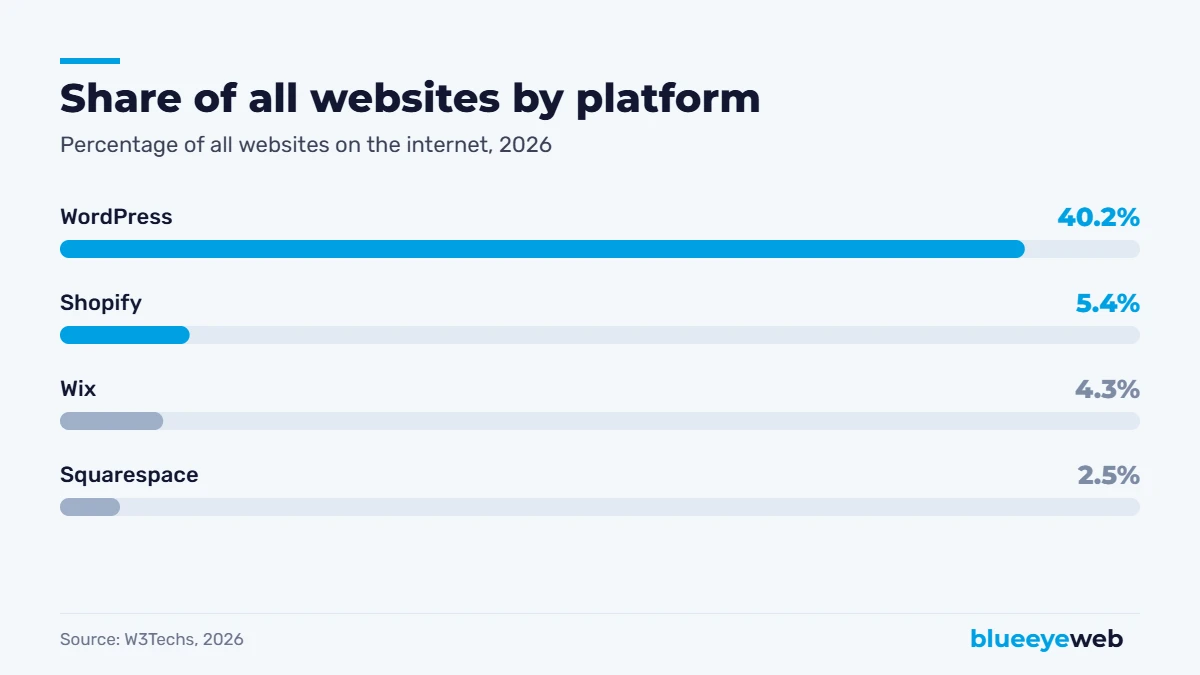
First, a quick bit of context. WordPress is free, open-source software that you install on any hosting you choose. It runs about 40% of all websites and close to 59% of sites whose platform can be identified, according to W3Techs’ October 2026 survey. Wix and Squarespace are hosted builders: you pay a monthly fee, and they handle hosting, security and updates inside their own system.
Small businesses are pretty split. Clutch’s 2025 survey found 41% built their sites on no-code tools like Wix or Squarespace, while 34% used platforms like WordPress or Shopify. Both camps are big because both approaches work, for different needs.
9 Key Differences That Actually Matter
1. Ownership: own vs rent
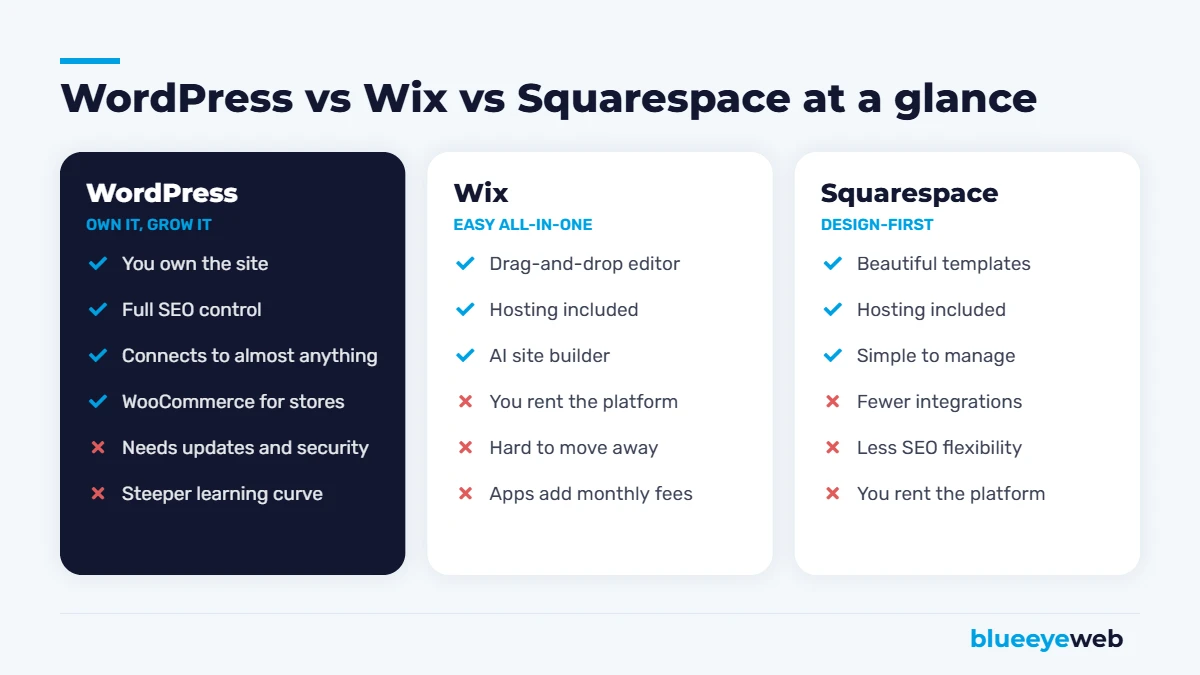
This is the difference most people only notice when it’s too late. With WordPress, you own the files and the database. Don’t like your host? Move. With Wix and Squarespace, you’re renting space on their platform. You can export some content, but not your design, and moving usually means rebuilding. In the WordPress vs Wix debate, ownership is the biggest long-term factor.
2. Monthly cost
Wix plans run roughly $17 to $159 a month on annual billing, and Squarespace sits in a similar range after its 2026 price changes, depending on the plan and billing cycle. WordPress itself is free, but you pay for hosting. Basic hosting can be as little as $40 to $150 a year, while managed hosting with updates, backups and security monitoring usually costs more. Our website care plans start at $75 a month with all of that included.
3. Upfront build cost
Wix and Squarespace are cheap to start if you build the site yourself. A professionally built WordPress site costs more upfront, typically $1,500 to $8,000 for a small business. Our full breakdown is in how much a website costs in 2026.
4. SEO control
All three can rank. The difference is how much control you get. WordPress, paired with a plugin like Rank Math, lets you control titles, schema markup, redirects, sitemaps, internal links and page speed in detail. Wix and Squarespace cover the basics well but get restrictive when you need advanced technical SEO. If Google is your main source of customers, this matters a lot.
5. Ease of use
Wix wins for beginners. Drag, drop, publish. Squarespace is a close second, with a more structured editor. WordPress has a learning curve, though a well-built WordPress site with a good page builder is easy enough to update once it’s set up and you’ve had a short training session.
6. Design flexibility
Squarespace has gorgeous templates, but you work inside their layouts. Wix gives you more freedom to place things anywhere, which can get messy on mobile. WordPress can look like anything, which is great with a designer and overwhelming without one.
7. E-commerce
For a handful of products, all three can work. For a real online store, WordPress with WooCommerce is the most flexible option. W3Techs reports WooCommerce on 47.7% of the e-commerce systems it detects. Shopify is the other strong choice for product-first brands. We build both, and our e-commerce team can help you pick.
8. Integrations and AI tools
WordPress connects to nearly anything: booking systems, CRMs, ERPs, shipping, marketing automation and AI tools like an AI website assistant. Wix has a solid app market. Squarespace has the fewest options of the three.
9. Security and maintenance
Here’s where hosted builders shine: they handle security for you. WordPress needs regular updates. Patchstack’s 2026 report counted 11,334 new vulnerabilities in the WordPress ecosystem in 2025, with 91% in plugins and only a handful in WordPress core. The fix isn’t avoiding WordPress, it’s using fewer, well-maintained plugins and keeping everything updated, which is exactly what a care plan does.
WordPress vs Wix vs Squarespace: Real Costs Side by Side
| WordPress | Wix | Squarespace | |
|---|---|---|---|
| Software | Free | Included in plan | Included in plan |
| Hosting | $40 to $150/yr basic, more for managed | Included | Included |
| Monthly plan | None (hosting only) | About $17 to $159/mo | Similar range, varies by plan |
| Premium tools | Optional plugins and themes | Paid apps add up | Fewer add-ons available |
| Professional build | $1,500 to $8,000+ | Varies | Varies |
| Moving later | Easy, you own it | Rebuild needed | Rebuild needed |
Prices are approximate and change often, so always check the current plan pages. The important point is the pattern: hosted builders are cheaper to start, WordPress is cheaper to grow.
Which Platform Is Best for Your Type of Business?
Local service businesses
Roofers, plumbers, dentists, lawyers, salons. You need to rank on Google for “service + city” searches and turn visitors into calls. WordPress is usually the best fit because you can build proper service pages, location pages and schema markup. Pair it with local SEO and a strong Google Business Profile.
Restaurants, cafes and small shops
If you mainly need a menu, hours, photos and directions, Squarespace or Wix can work well. Just keep your hours and phone number consistent everywhere.
Online stores
WooCommerce on WordPress or Shopify. Choose WooCommerce for flexibility and ownership, Shopify for simplicity at scale.
Photographers, designers and creatives
Squarespace is a strong choice here. Beautiful galleries, little maintenance.
Growing companies and B2B
WordPress, almost every time. Integrations, content marketing and SEO flexibility matter more as you grow.
Common Myths About WordPress vs Wix
- “WordPress is only for blogs.” Not for a long time. Big brands, stores and agencies run on it.
- “Wix sites can’t rank.” They can, especially for easy searches. They just give you less control for competitive ones.
- “WordPress isn’t secure.” WordPress core is very secure. Most problems come from outdated plugins and cheap hosting, which proper maintenance fixes.
- “Squarespace is too expensive.” For a small, rarely updated site, it can actually be good value, since hosting and security are included.
Can You Switch Platforms Later?
Yes, and people do it all the time, most often from Wix or Squarespace to WordPress as they grow. The key is protecting your Google rankings during the move: keep or redirect every URL, carry over titles and content, and resubmit your sitemap. We cover the full process in our guide to redesigning a website without losing SEO.
Before you switch: export a list of every page URL on your current site and check which ones get traffic in Google Search Console. Those pages need a 301 redirect to their new address, or you risk losing the rankings they’ve built.
WordPress vs Wix for Local SEO: A Closer Look
If you’re a local business, the WordPress vs Wix question often comes down to one thing: can you show up when someone nearby searches for what you do? Both platforms let you set page titles and descriptions. The difference shows up when you need more than the basics.
On WordPress, we can build a separate page for every service and every area you serve, add LocalBusiness and Service schema, control exactly how internal links flow between pages, and tune speed down to individual images. On Wix, you can do a good part of that, but you’ll hit limits on schema, URL structure and speed sooner. For a plumber in Boynton Beach competing with ten others for “emergency plumber near me,” those details add up.
That’s why, when the WordPress vs Wix choice is really about winning local searches, we lean WordPress. Pair it with a complete Google Business Profile and our local SEO checklist, and you’ve covered most of what Google looks at.
WordPress vs Wix: What Maintenance Really Looks Like
People often say Wix is “maintenance-free.” That’s mostly true for the technical side: Wix handles hosting, updates and security for you. You still need to keep content, hours, prices and photos current, which is the same work on any platform.
WordPress needs a bit more care. Plugins and themes need updates, backups need to run, and someone should keep an eye on security and speed. Done monthly, it’s routine. Ignored for a year, it’s how sites get hacked. When people compare WordPress vs Wix on maintenance, the fair comparison is “Wix plan” vs “WordPress plus a care plan,” and on that basis the costs are much closer than they look. Our guide to website maintenance costs breaks it down.
5 Questions to Settle the WordPress vs Wix Debate
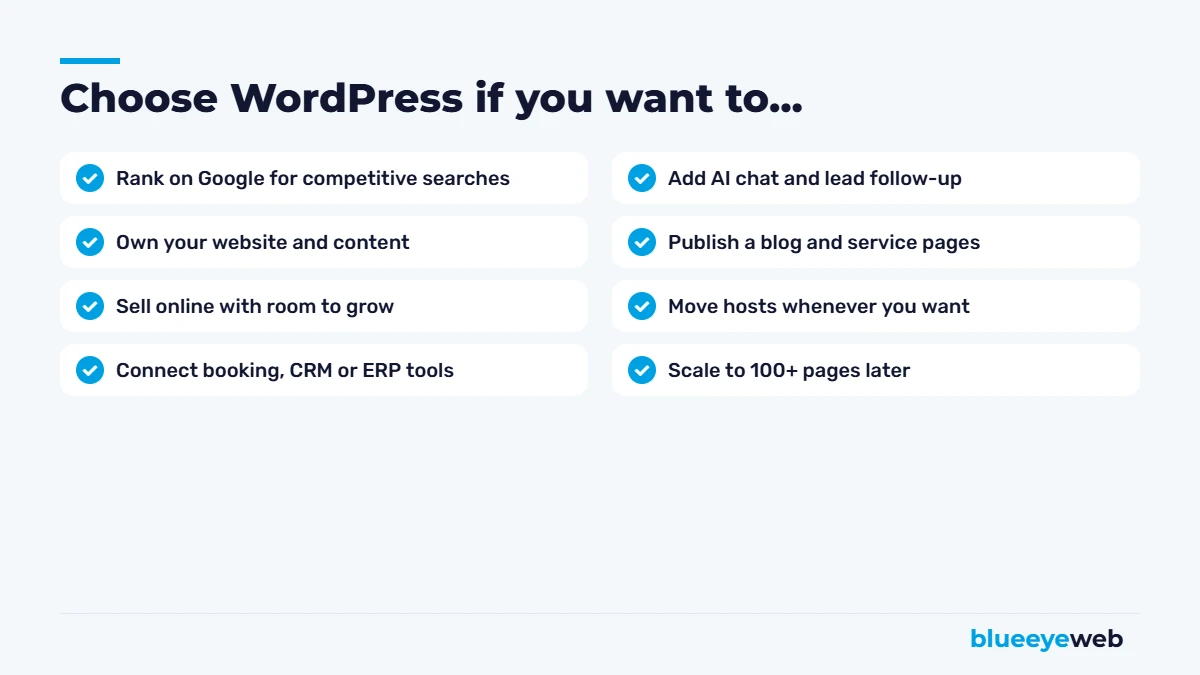
- Do you want to own your website outright? If yes, WordPress.
- Will Google be your main source of customers? If yes, WordPress usually gives you the edge.
- Do you want to build and edit everything yourself, today? If yes, Wix is easier to start.
- Will you need bookings, a CRM, a store or AI tools? The more you need, the more WordPress makes sense.
- Is the site mostly a visual portfolio? Then Squarespace deserves a serious look.
Count your answers. If most point to ownership, SEO and growth, that settles WordPress vs Wix in favor of WordPress. If they point to speed and simplicity, Wix or Squarespace is a perfectly good starting point.
Our Honest Take on WordPress vs Wix
For most small businesses that rely on Google and want to grow, WordPress is the platform we recommend, and it’s what we build on at BlueEyeWeb. It’s the only one of the three you truly own, and it grows with you, from a 5-page site to a full store with AI tools and integrations.
That said, if you want to build it yourself this weekend and keep it simple, Wix or Squarespace is a perfectly reasonable choice. Just know what you’re trading for that convenience. If you’re also weighing AI tools, our guide on AI website builders vs web designers covers that side.
Want a straight answer for your business?
Tell us what you sell and how customers find you. We’ll recommend the right platform, even if it’s not the one we build on.
Frequently Asked Questions
WordPress gives you more SEO control, including detailed titles, schema markup, redirects, site speed and internal linking. Wix covers the basics well and can rank for easy searches, but WordPress is usually the stronger choice for competitive local and national SEO.
Wix is cheaper to start if you build the site yourself, with plans around $17 to $159 a month. WordPress software is free, and hosting can cost as little as $40 to $150 a year, but a professional build and maintenance add cost. Over several years, WordPress is often cheaper to grow.
For small businesses that rely on Google and plan to grow, WordPress is usually the best fit. Wix suits owners who want to build it themselves quickly, and Squarespace suits design-focused portfolios and simple sites.
Yes. Your content and domain can move, but the design usually needs to be rebuilt. Use 301 redirects for every old URL to protect your Google rankings during the switch.
WordPress core is very secure. Most security issues come from outdated plugins, weak passwords and cheap hosting. Keeping plugins updated, using fewer of them and running backups and monitoring keeps a WordPress site safe.
You own your content, but you rent the platform. Your design cannot be moved to another platform, so switching later usually means rebuilding the site.
Sources
- W3Techs: CMS and e-commerce usage statistics, 2026
- Clutch: Small Business Websites in 2025
- Patchstack: State of WordPress Security in 2026
- WebsiteSetup: Small business website costs 2026
- Wix and Squarespace public pricing, 2026