Most business owners hear about website accessibility the hard way: a demand letter arrives claiming their site violates the Americans with Disabilities Act. In Florida, that’s become more common, not less.
The good news is that making your site accessible isn’t mysterious, and it makes your website better for everyone. In this guide, we’ll explain what ADA compliance for websites means in 2026, why lawsuits keep rising, what standard to follow, the most common problems and a practical checklist to get started. One quick note first: we build websites, we’re not lawyers. For legal advice about your situation, talk to an attorney.
The short version
- The ADA applies to many business websites, and courts usually measure them against the WCAG accessibility guidelines.
- Website accessibility lawsuits rose 27% in federal court in 2025, and Florida filings nearly doubled.
- Almost every website has detectable issues: low contrast, missing alt text and unlabeled forms top the list.
- Accessibility widgets alone don’t make a site compliant. Fixing the site itself does.
What Does ADA Compliance Mean for a Website?
The Americans with Disabilities Act prohibits discrimination against people with disabilities, including by “places of public accommodation” like stores, restaurants, medical offices and service businesses. The law was written in 1990, before business websites existed, but the Department of Justice has long said the ADA applies to the web. Its guidance on web accessibility makes that clear for businesses open to the public.
In practice, an accessible website is one that people with disabilities can use: someone who is blind using a screen reader, someone who can’t use a mouse and navigates by keyboard, someone with low vision who zooms in, someone who is deaf watching your videos, or someone with a cognitive disability trying to fill in your form.
Is There an Official Standard?
For private businesses, the ADA doesn’t spell out a technical standard for websites. But courts, settlements and the DOJ consistently point to the Web Content Accessibility Guidelines (WCAG). The current version is WCAG 2.2, and most businesses aim for Level AA. For state and local governments, a 2024 DOJ rule now requires WCAG 2.1 AA specifically.
So when people talk about an “ADA compliant website,” they almost always mean a website that meets WCAG 2.1 or 2.2 at Level AA.
Why Website Accessibility Lawsuits Keep Rising
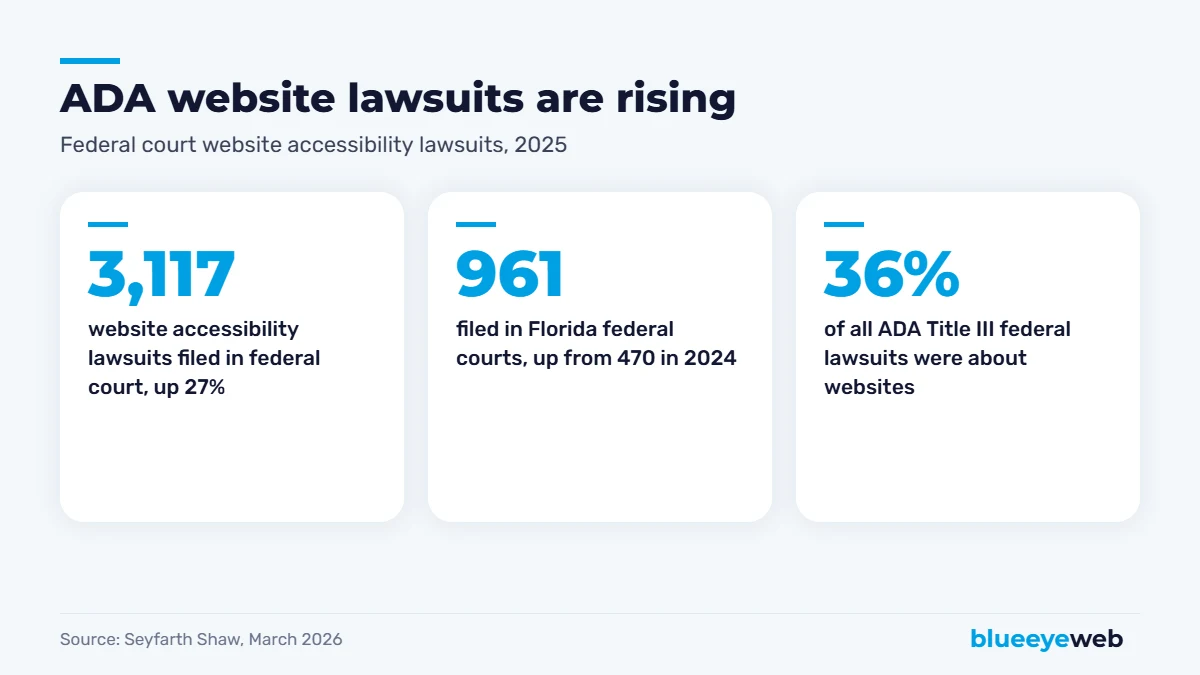
According to Seyfarth Shaw’s tracking of federal cases, plaintiffs filed 3,117 website accessibility lawsuits in federal court in 2025, a 27% increase over 2024, and these cases made up 36% of all ADA Title III federal lawsuits. Florida’s federal website cases nearly doubled, from 470 to 961. Counting state courts too, UsableNet tracked more than 5,000 digital accessibility lawsuits in 2025, with e-commerce businesses the most frequent targets.
Small businesses aren’t exempt. Many suits target restaurants, retailers, medical practices and local service companies, and many defendants have been sued before. Settling a single case can cost more than fixing the website properly would have.
The 4 Principles of Website Accessibility (POUR)
WCAG is built on four principles. If you remember these, the details make sense.
Perceivable
People must be able to perceive the content. That means text alternatives for images, captions for videos, enough color contrast and content that still makes sense when zoomed in.
Operable
People must be able to use every part of the site, including with only a keyboard. Menus, buttons, forms, sliders and pop-ups all need to work without a mouse, and nothing should flash in ways that can trigger seizures.
Understandable
Content and controls should be clear and predictable. Forms need labels and helpful error messages, the page language should be set and navigation should behave consistently.
Robust
The site should work with assistive technologies like screen readers. That mostly comes down to clean, standard code: real buttons and links, proper headings and correct labels.
The Most Common Accessibility Problems
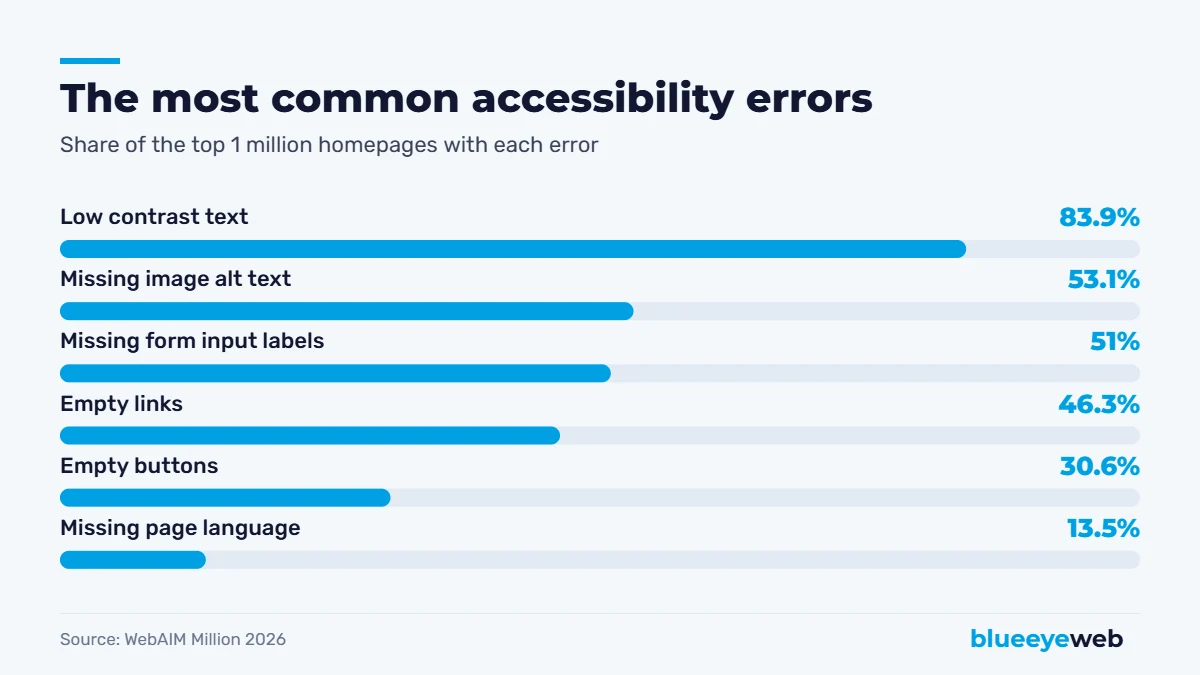
The WebAIM Million 2026 report tested the top one million homepages and found detectable WCAG failures on 95.9% of them, averaging 56.1 errors per page. The same six problems top the list every year, and the good news is that all six are fixable:
Low contrast text
Light gray text on white, or white text on a light photo, is hard to read for people with low vision and for everyone on a phone in the sun. Normal text needs a contrast ratio of at least 4.5:1.
Missing alt text
Screen readers rely on alt text to describe images. Every meaningful image needs a short description; purely decorative images should have empty alt text so they’re skipped.
Missing form labels
Placeholder text that disappears when you type isn’t a label. Every field needs a real label so screen reader users know what to enter.
Empty links and buttons
Icon-only buttons (like a magnifying glass or social media icons) need accessible names. Otherwise a screen reader just announces “link” or “button.”
Missing page language
A small line of code tells screen readers which language to speak. It takes seconds to fix.
Do Accessibility Widgets Make a Website ADA Compliant?
This is one of the most common questions we get, and the honest answer is no, not on their own. Accessibility overlays and widgets add a toolbar that lets visitors change contrast or text size, and some try to fix code automatically. They can’t fix underlying problems like unlabeled forms, inaccessible menus or images that need real descriptions.
Regulators have noticed. In April 2025, the FTC finalized an order requiring one of the best-known widget companies, accessiBe, to pay $1 million and stop claiming its tool could make any website WCAG compliant without evidence. Many businesses using widgets have still been sued. A widget can be a nice extra, but it’s not a substitute for an accessible website.
Be careful with “instant ADA compliance” promises. No tool can guarantee legal compliance with one line of code. Real accessibility comes from fixing your site’s design, content and code, and keeping it that way.
How to Check Your Website’s Accessibility
- Run an automated scan. Free tools like WAVE and the Lighthouse accessibility audit in Chrome catch many common errors in minutes.
- Test with your keyboard. Put the mouse away and press Tab through your homepage, menu, contact form and checkout. Can you see where you are? Can you reach and use everything?
- Zoom to 200%. Does the layout still work, or does text overlap and disappear?
- Try a screen reader. VoiceOver on Mac and iPhone and NVDA on Windows are free. Listen to your homepage and a form.
- Get a manual review. Automated tools catch only part of the problems. An expert review covers the rest, like whether alt text actually makes sense.
Website Accessibility Checklist
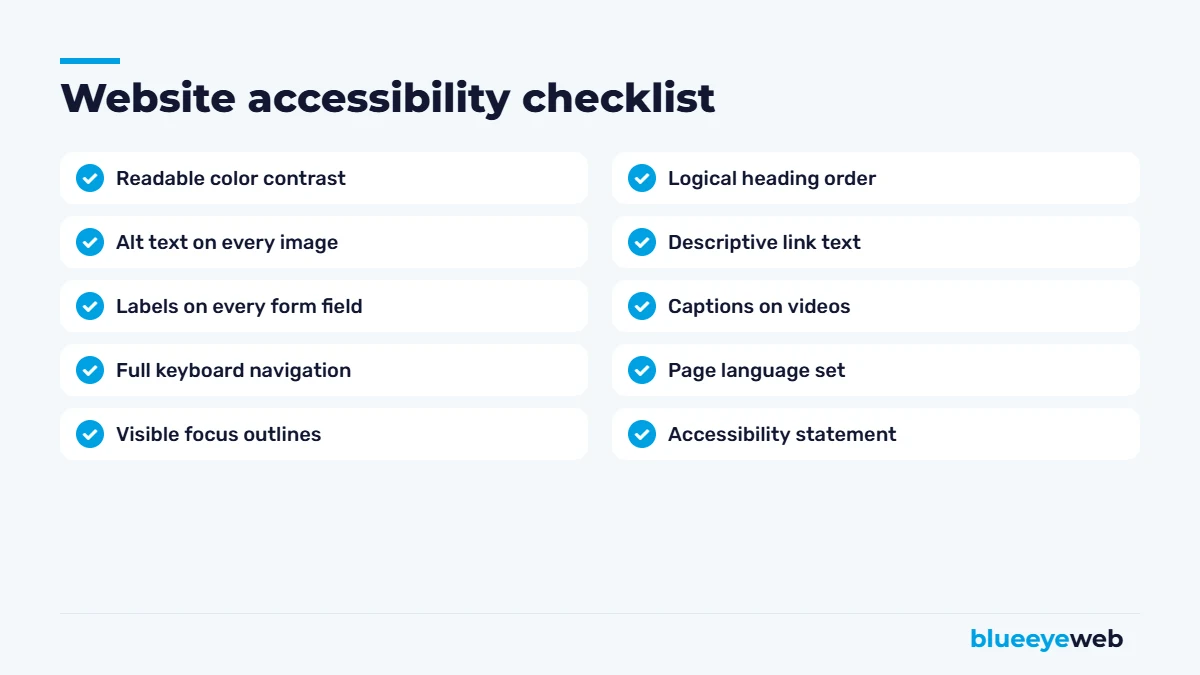
- Text and buttons meet WCAG contrast ratios.
- Every meaningful image has descriptive alt text.
- Every form field has a visible label and clear error messages.
- The whole site works with a keyboard, with a visible focus outline.
- Headings follow a logical order (one H1, then H2, H3).
- Links say where they go (“View our pricing,” not “Click here”).
- Videos have captions; audio has transcripts.
- Pop-ups can be closed with a keyboard and don’t trap focus.
- The page language is set.
- PDFs and documents you publish are accessible too.
- You publish an accessibility statement with a way to report problems.
A 30-Day ADA Compliance Website Plan
If your site has never been reviewed, here’s a realistic way to make meaningful progress in a month without stopping your business.
Week 1: Find the problems
Run WAVE and Lighthouse on your homepage, main service or product pages, contact page and checkout. Do the keyboard test on the same pages. Write every issue into a simple list with the page and a screenshot.
Week 2: Fix the high-impact basics
Correct color contrast in your theme settings, add alt text to images, label every form field, set the page language and give icon buttons accessible names. These fixes usually cover a large share of automated errors.
Week 3: Fix navigation and interaction
Make menus, sliders, pop-ups and forms fully usable by keyboard, with a visible focus outline. Check heading order on your key pages and rewrite vague links like “click here.”
Week 4: Document and maintain
Publish an accessibility statement with a contact email for reporting problems, caption your videos and train whoever updates the site to add alt text and use proper headings. Then schedule a quick check every quarter, because new content and plugin updates can reintroduce issues.
An ADA compliance website effort isn’t a one-time project. It’s a habit, the same way security updates and backups are. The businesses that handle it best simply make accessibility part of how they publish.
If you’d rather not do this alone, an outside review gives you a clear starting list and someone to confirm the fixes actually work with assistive technology, not just in an automated scanner.
Accessibility Is Also Good for SEO and Sales
Accessibility and SEO overlap more than most people realize. Alt text helps image search. Clear headings help Google and AI tools understand your content. Descriptive links, fast pages and clean code improve both rankings and usability. And roughly one in four US adults lives with some kind of disability, according to the CDC, so an accessible site simply serves more customers.
It also improves conversions for everyone. Clear forms, readable text and obvious buttons help people on small phone screens, in bright sunlight, in a hurry or using a site in their second language.
What If You Receive an ADA Demand Letter?
Don’t ignore it, and don’t panic. Contact an attorney who handles ADA website cases, and start documenting the accessibility of your site. Many businesses also begin remediation right away, because a credible plan to fix the site and a record of progress matter. Avoid quick fixes that only look like progress, like installing a widget and hoping the problem goes away.
How We Handle Accessibility
Accessibility is part of how we build every site, not an add-on. In our website design and website redesign projects, we check contrast, headings, keyboard navigation, forms and alt text before launch. For existing sites, we run an accessibility review, fix the issues in your theme and content, and help you keep it accessible with our website care plans.
If you’re planning a redesign anyway, it’s the perfect time to build accessibility in. Our guide to redesigning without losing SEO pairs well with this one.
Is your website accessible?
We’ll review your site against the most common WCAG issues, show you what to fix first and give you a clear quote to fix it properly, no widgets required.
Frequently Asked Questions
The Department of Justice says the ADA applies to the websites of businesses open to the public, and many lawsuits target small businesses. Talk to an attorney about your specific situation.
Most businesses aim for WCAG 2.1 or 2.2 Level AA. Courts and settlements commonly reference WCAG, and the DOJ requires WCAG 2.1 AA for state and local government websites.
Not on its own. Widgets cannot fix underlying code and content issues, and the FTC fined one widget maker $1 million in 2025 over claims that its tool could make any site compliant.
It depends on the size and condition of the site. Small sites with common issues can often be fixed in days, while large or complex sites need a full audit and ongoing work. Building accessibility into a new site costs far less than fixing it later.
Start with a free scan using WAVE or Lighthouse, test your site with only a keyboard, zoom to 200% and try a screen reader. Then get a manual expert review, because automated tools miss many issues.
Yes. Alt text, clear headings, descriptive links, fast pages and clean code help both accessibility and search rankings, and they make your content easier for AI tools to understand.
Sources
- Seyfarth Shaw: Federal court website accessibility lawsuit filings in 2025
- UsableNet: 2025 Year-End Digital Accessibility Lawsuit Report
- WebAIM: The WebAIM Million 2026
- ADA.gov: Guidance on Web Accessibility and the ADA
- W3C: Web Content Accessibility Guidelines (WCAG) 2.2
- FTC: Final order requiring accessiBe to pay $1 million