Most small businesses don’t think about IT until something breaks: email stops working, a laptop dies before a big deadline, or a suspicious message turns into a locked-up computer. By then, it’s expensive, stressful and slow to fix.
Good IT support for small business is about preventing those days, and making them short when they do happen. In this guide, we’ll explain the main types of IT support, what they cost in 2026, what every small business actually needs and how to choose the right partner, without the jargon.
The short version
- Small business IT support covers help desk, device management, security, backups, email, networks and planning.
- There are three main models: break-fix (pay per problem), managed IT (flat monthly fee) and co-managed (support for your in-house person).
- Managed IT for small businesses typically runs about $100 to $250 per user per month, depending on scope and security needs.
- Security is now the biggest reason to get proper IT support. Ransomware hits small businesses hardest.
What Does IT Support for a Small Business Include?
IT support is everything that keeps your technology working, secure and useful. For a typical small business with 5 to 50 people, that usually means:
- Help desk: someone to call, email or message when something isn’t working, from password resets to printer problems.
- Device management: setting up, updating and protecting laptops, desktops, phones and tablets.
- Security: antivirus and endpoint protection, email filtering, multi-factor authentication and monitoring for threats.
- Backups and recovery: making sure files, email and systems can be restored after a mistake, failure or attack.
- Email and Microsoft 365 or Google Workspace: accounts, licenses, shared mailboxes and permissions.
- Network: Wi-Fi, firewalls, routers and internet connections.
- Cloud and software: file storage, line-of-business apps and integrations.
- Planning: budgeting for replacements, choosing tools and planning for growth.
You may not need all of this from day one. But every business needs someone responsible for each item, even if that someone is the owner with a checklist.
Why IT Support Matters More Than Ever
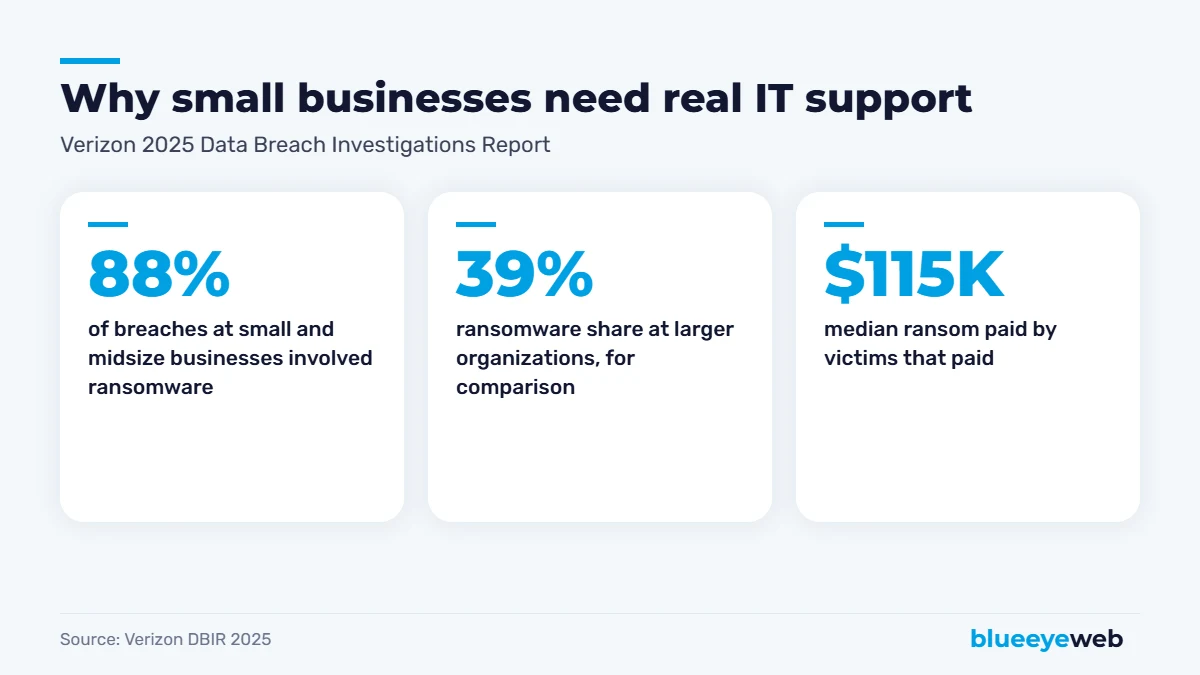
The biggest change in recent years is security. Attackers have learned that small businesses are easier targets than large companies with full security teams. Verizon’s 2025 Data Breach Investigations Report found ransomware was involved in 88% of breaches at small and midsize businesses, compared with 39% at larger organizations. Among victims that paid, the median ransom was $115,000, before counting downtime, recovery and lost customers.
The fixes that stop most attacks aren’t exotic: updated systems, multi-factor authentication, good backups, email filtering and trained staff. That’s exactly what proper IT support provides. Government agencies agree: CISA’s Cyber Essentials and the FTC’s small business cybersecurity guide both start with these basics.
The 3 Types of Small Business IT Support
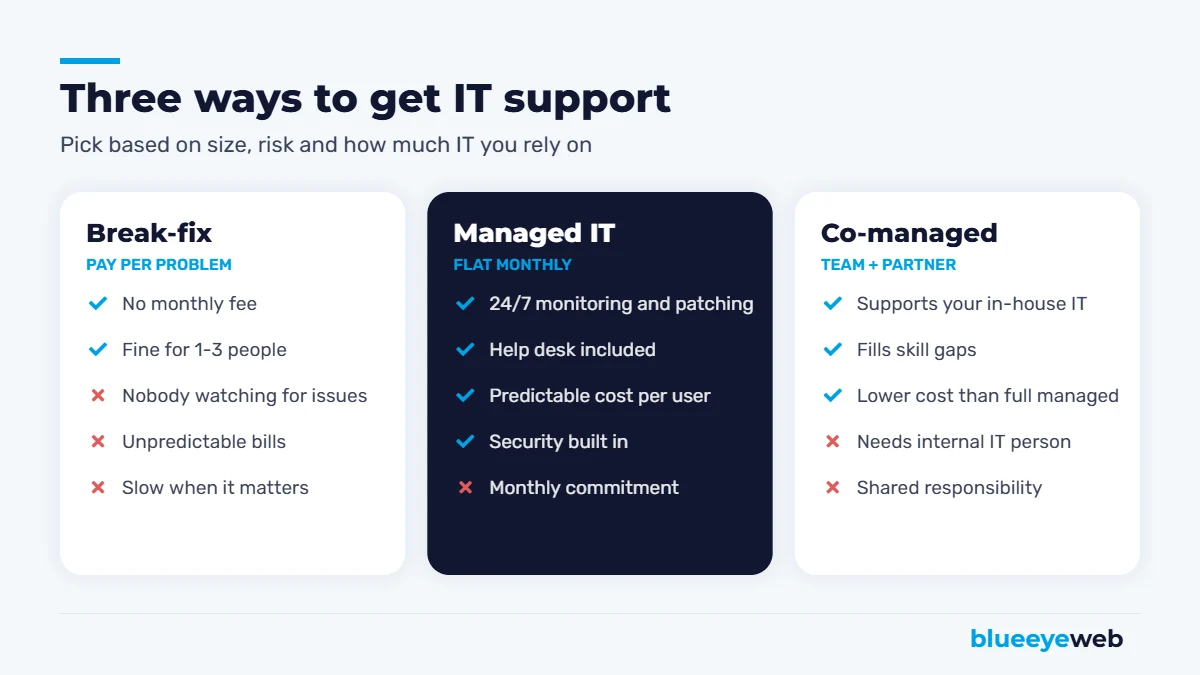
1. Break-fix IT support
You call someone when something breaks and pay by the hour or by the job. It’s how most small businesses start, and it can work for very small teams with simple setups.
The problem is that nobody is watching in between. Updates get skipped, backups quietly fail, warning signs go unnoticed, and when something does break, the clock starts on finding someone, getting on their schedule and paying emergency rates. Break-fix providers also earn more when things go wrong, which isn’t the incentive you want.
2. Managed IT services
A managed service provider (MSP) takes ongoing responsibility for your IT for a flat monthly fee, usually priced per user or per device. That typically includes help desk support, 24/7 monitoring, patching and updates, security tools, backups and regular reviews.
Because the provider is paid the same whether things go well or not, their incentive is to prevent problems. For most businesses with five or more people who rely on their computers every day, this is the model we recommend.
3. Co-managed IT
If you already have an internal IT person, co-managed support fills the gaps: after-hours monitoring, security tools, specialized projects or backup coverage when they’re on vacation. It’s cheaper than full managed IT and keeps your in-house knowledge.
Remote vs on-site support
Today, most IT issues are solved remotely, often within minutes. Remote support is faster and cheaper than waiting for a technician to drive over. On-site visits still matter for hardware, network installs and office moves, so ask any provider how they handle both.
How Much Does IT Support Cost for a Small Business?
Pricing varies by region, scope and how much security is included, but here are the typical ranges you’ll see in the US in 2026:
| Model | Typical cost | What you usually get |
|---|---|---|
| Break-fix | $100 to $200+ per hour | Fixes when you call, no monitoring |
| Basic managed IT | About $100 to $150 per user per month | Help desk, monitoring, patching, antivirus |
| Full managed IT | About $150 to $250 per user per month | Adds advanced security, backups, planning, priority response |
| Co-managed IT | Often lower than full managed | Tools and backup for your internal IT staff |
| Projects | Quoted separately | New office setup, migrations, server replacements |
A 10-person office on a $150 per user plan would spend about $1,500 a month. That sounds like a lot until you compare it to a full-time IT hire, or to a single week of downtime after a ransomware attack. For many small businesses, managed IT costs less than one employee’s salary and covers far more skills.
Read the fine print: ask what’s included and what’s billed extra. After-hours support, on-site visits, new device setup, projects and software licenses are the most common add-ons.
The IT Basics Every Small Business Needs
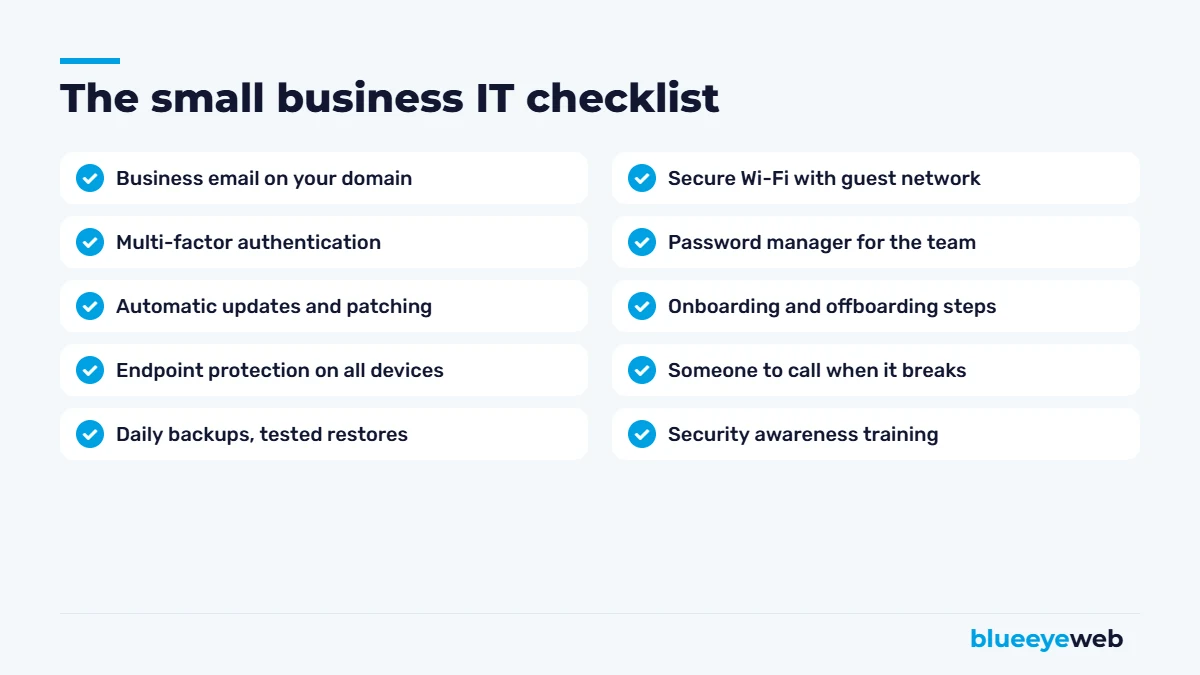
Whether you hire a provider or handle it yourself, make sure these basics are covered.
Professional email on your domain
An address like you@yourbusiness.com builds trust and gives you control over accounts when people come and go. Set it up properly with SPF, DKIM and DMARC so your emails reach inboxes. Our business email setup covers all of it.
Multi-factor authentication everywhere
Turn it on for email, banking, your website, cloud storage and anything else that supports it. It blocks the vast majority of password-based attacks.
Automatic updates
Operating systems, browsers, apps and website plugins all need regular updates. Unpatched software is one of the most common ways attackers get in.
Backups you’ve actually tested
Follow the 3-2-1 rule: three copies of important data, on two different types of storage, with one copy offsite or in the cloud. Then test a restore. A backup you’ve never restored is a hope, not a plan.
Endpoint protection and monitoring
Modern antivirus with detection and response watches for suspicious behavior on every device. Paired with security monitoring, it catches problems before they spread.
A secure network
Change default router passwords, use a business-grade firewall, keep a separate guest Wi-Fi for visitors and update network equipment. Our network and server management service handles this for offices across South Florida.
Onboarding and offboarding
Have a checklist for new hires (accounts, devices, permissions) and departing staff (remove access the same day, recover devices, transfer files). It’s a security step most small businesses skip.
Cloud tools that fit
Microsoft 365 or Google Workspace, shared file storage and the right business apps reduce your dependence on a single office computer. A good cloud setup means your team can work from anywhere without risking your data.
Signs You’ve Outgrown DIY IT
- You or a key employee spend hours each week fixing tech problems instead of doing your actual job.
- You’re not sure your backups work, or when they last ran.
- Different people set up their own devices and accounts, with no consistent security.
- You’ve had a close call: a phishing email, a hacked account or a lost laptop.
- You handle sensitive data such as health records, financial information or client files.
- Your insurance company or a big client is asking about your cybersecurity.
If two or more of these sound familiar, it’s time for proper IT support.
Managed IT vs Hiring an In-House IT Person
At some point, many owners ask whether they should just hire someone. For a business under about 50 people, outsourced IT support for small business usually wins on both cost and coverage. One in-house employee costs a full salary plus benefits, can’t cover every skill from networking to security to Microsoft 365, and takes vacations and sick days. A managed provider gives you a whole team, monitoring tools you’d otherwise have to buy, and coverage when your main contact is out.
That said, an internal person who knows your business and people is valuable. As you grow, the best setup is often co-managed: an in-house IT lead for day-to-day needs, backed by a provider for security, after-hours monitoring and bigger projects.
What to Expect in the First 30 Days
Switching to a new IT partner shouldn’t be chaotic. A good onboarding usually looks like this: in the first week, the provider documents every device, account, license and password and installs monitoring tools. In weeks two and three, they fix urgent risks such as missing backups, outdated systems, accounts without multi-factor authentication and former employees who still have access. By the end of the first month, you should receive a written summary of what they found, what they fixed and a short roadmap with budget estimates for the next 12 months.
If a provider can’t explain their onboarding process clearly, that tells you something about how they’ll handle your IT support for small business needs once the contract is signed.
How to Choose an IT Support Provider
Here are the questions we’d ask any provider, including us:
- What’s included in the monthly fee? Get a clear list. Vague answers lead to surprise invoices.
- What are your response times? Look for written commitments for urgent and normal issues.
- How do you handle security? Ask about MFA, patching, endpoint protection, email filtering and backups.
- Who owns our accounts and data? You should. Admin credentials should be documented and shared with you.
- Can we talk to a real person? Small businesses need someone who knows their setup, not a ticket number.
- What’s the contract length and exit process? Make sure you can leave cleanly with all your documentation.
- Do you plan ahead with us? A good partner helps you budget for replacements and growth, not just fix today’s problem.
Local IT Support in Boynton Beach and Palm Beach County
Remote support handles most day-to-day issues, but having a local partner still matters when you need hands-on help with a network install, an office move or a server problem. BlueEyeWeb provides IT support for small businesses in Boynton Beach, Delray Beach, Boca Raton, Lake Worth and across Palm Beach County, plus remote support nationwide.
We combine help desk, IT maintenance and monitoring, security and IT consulting and planning so you have one team that understands your whole setup, from your laptops to your website. If your website runs on WordPress, our guide to WordPress security covers the web side of keeping your business safe.
Tired of being your own IT department?
Tell us about your team and setup. We’ll recommend the right level of support, give you a clear monthly price and show you exactly what’s included.
Frequently Asked Questions
It usually includes help desk support, device setup and updates, security tools, backups, email and Microsoft 365 or Google Workspace management, network support and IT planning.
Break-fix support often costs $100 to $200 or more per hour. Managed IT services for small businesses typically run about $100 to $250 per user per month, depending on how much security and support is included.
Break-fix means you pay when something breaks. Managed IT is a flat monthly fee for ongoing monitoring, maintenance, security and help desk support, so problems are prevented as well as fixed.
Not always. Very small teams with simple setups can manage with break-fix and good habits. Once you have five or more employees, sensitive data or rely heavily on technology, managed IT usually costs less than the downtime and risk it prevents.
Most issues today are solved remotely, often in minutes. On-site visits are still needed for hardware, network installation and office moves.
Turn on multi-factor authentication for email and key accounts, keep systems updated and make sure backups work. These basics stop most common attacks.